Planet Zoo 2 · Aquarium water
A water filter is placed, but the aquarium still has a warning
On this page
Connect the aquarium Staff Gate’s node to a powered filtration network, then check demand and salinity separately. A green capacity check does not mean the water type suits your animals. A filter sitting nearby without a network connection is not the same as a working aquarium supply.
Published October 20, 2026 · English PC interface · Official instructions checked October 20
Read the warning before adding another filter
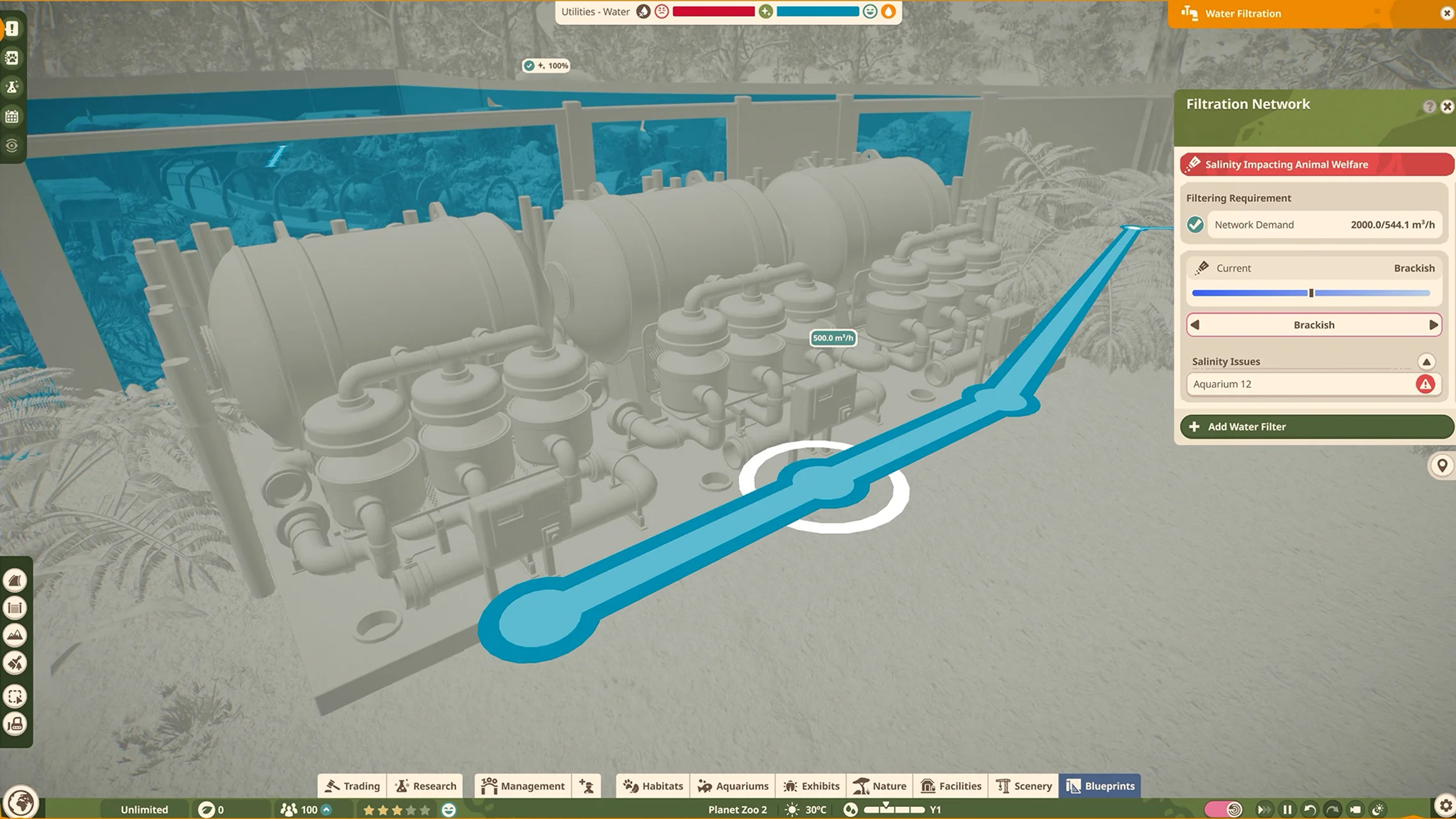
Open the filtration view and identify the affected aquarium. Compare the current water type with the Zoopedia requirements for every species in that tank. The available types are Fresh, Brackish and Salt. A shared tank needs a choice suitable for all its occupants; matching one animal while ignoring the others leaves a welfare problem.
Connect the network
- Place a Water Filter from Facilities → Utilities.
- Select it and open Edit Filtration Network.
- Build the pipe connection between the aquarium node at its Staff Gate and the filtration building.
- Confirm power and inspect the network’s current connections, demand and salinity.
Do not start with a Water Pump simply because an older habitat-water tutorial used one. Frontier describes pumps for bodies of natural habitat water; an aquarium connects through its Staff Gate node. Use the connection type for the home you actually built.
Recheck after expanding or adding fish
Filtration demand depends on water volume and animal numbers. A network adequate for a small first tank can become inadequate after an extension or a population increase. Frontier’s aquarium guide calls for the filtration rate to exceed demand to prevent water cleanliness falling.
Inspect that comparison after each substantial change. If the network is short of capacity, add working capacity and verify that it is actually connected. Do not copy the numerical values from the screenshot: they describe that example zoo, not a recommended filter count for yours.
Check access to the filter’s maintenance panel too. Mechanics maintain filtration buildings, so a network should remain serviceable after scenery and paths are added.
Clean water and a clean tank are separate
If the water setup checks out but the aquarium itself is dirty, inspect keeper cleaning. Keepers clean the tank; mechanics look after filters and barriers. Low water cleanliness also makes the tank become dirty faster. Adding filters cannot replace a keeper’s cleaning visit.
For persistent warnings, capture the tank, its occupants’ salinity requirements and the network panel together. A red welfare warning with green capacity is particularly useful evidence: it prevents the next troubleshooting attempt from repeating the wrong upgrade.
Sources and version
Written for Planet Zoo 2, with the English PC interface and Frontier’s live player guides checked October 20, 2026. Frontier: aquarium filtration, demand and tank cleanliness; network construction; maintenance responsibilities. Game images are limited publisher instructional excerpts, credited at each image; they show the controls, rather than a personal gameplay test.