Planet Zoo 2 · Feeding
Animals hungry while keepers are nearby? Follow the food delivery
On this page
Select the keeper and check that Feed Habitat is enabled, then check the Keeper Hut and the animal’s feeding objects. A keeper walking through the habitat may be assigned to cleaning. Hiring another worker will not fix a disabled feeding task or an unusable food-preparation building.
Published October 20, 2026 · English PC interface · Official instructions checked October 20
Read what this keeper is doing
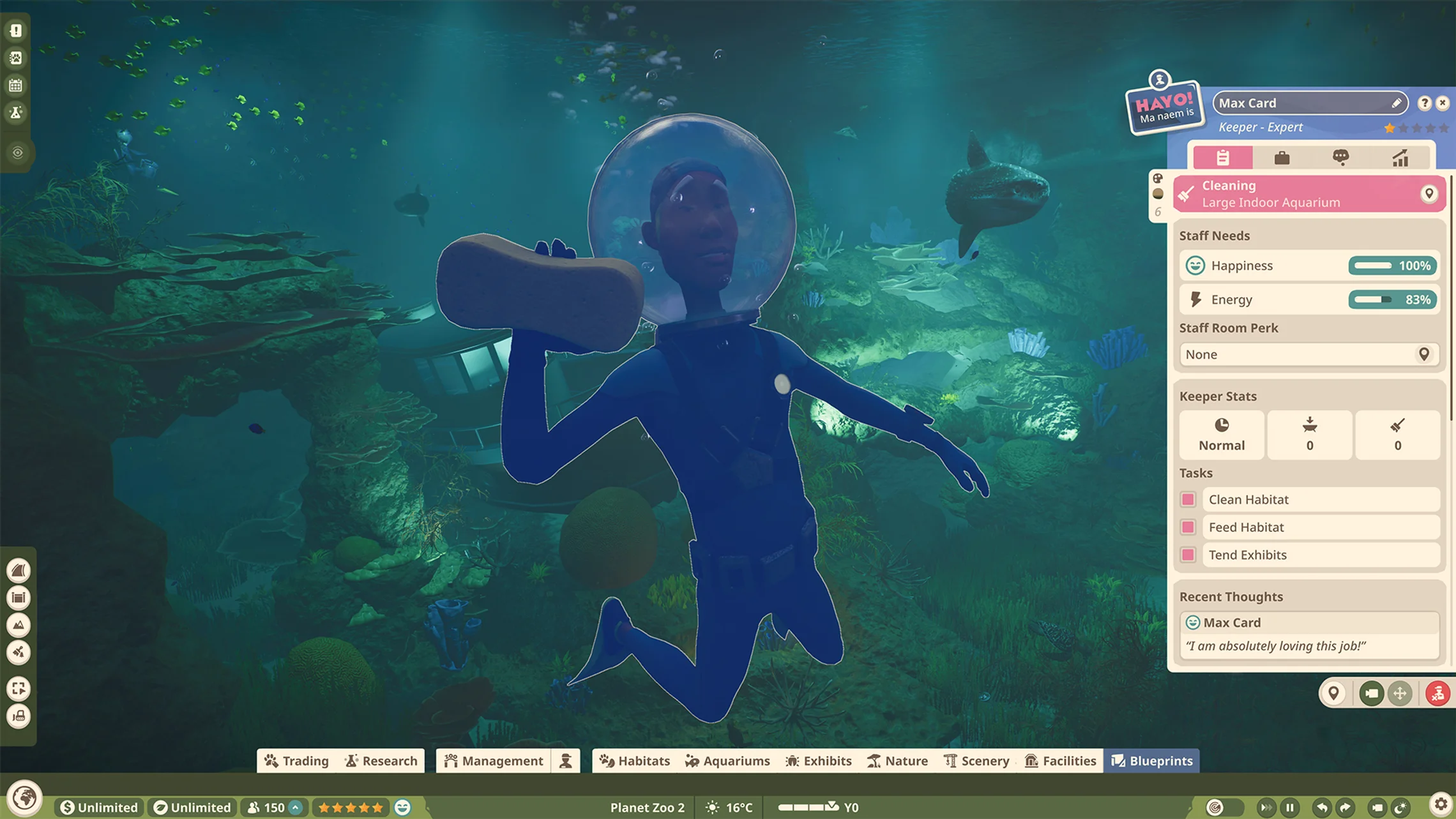
Select the worker, read the current assignment and inspect the Tasks checkboxes. If you deliberately made a cleaning-only keeper, assign feeding to another keeper or enable that task for this one. Keepers handle food and habitat upkeep; a caretaker moving an animal crate is not a substitute.
Also check energy. A tired worker needs an accessible Staff Room before they can keep working. Adding jobs to an exhausted keeper does not remove that delay.
Check the preparation and delivery route
- Locate the Keeper Hut serving this part of the zoo. It prepares animal food; a Staff Room serves a different purpose.
- Confirm that the hut is powered and connected by path, then inspect the route to the habitat or aquarium Staff Gate.
- Check the keeper’s Work Zone in Management → Staff → Work Zones. Include the intended home and nearby facilities when organising the zone.
- Look for long walks or a queue for food preparation before spending money on extra keepers.
A useful test is one nearby hut and one affected animal home. Watch whether the keeper prepares and delivers food. If they reach a door and turn back, capture that access failure separately; repeatedly changing the diet does not test a path problem.
Do not assume a hut missing from a Work Zone is completely forbidden. Frontier says staff can seek a needed facility outside their zone if it is absent. Poor placement can still produce a much longer trip.
Make sure the food belongs to these animals
Filter the Habitat or Aquarium browser by species and check the feeders or food enrichment you placed. A visually suitable feeding object is not enough if it is for another species. Check the hungry individual as well as the shared enclosure: one animal’s problem can be hidden by looking only at the habitat.
Food quality is managed under Zoo Management → Animals → Food. Higher quality costs more and supports thriving, but changing quality is not the first fix for food that never arrives. First establish that a compatible feeding object gets stocked and the animal can reach it.
If every step checks out but no delivery occurs, keep a save and record the keeper’s task, hut status and blocked point. Launch-week staff access reports exist; this checklist does not turn those reports into a guaranteed reset workaround.
Sources and version
Written for Planet Zoo 2, with the English PC interface and Frontier’s live player guides checked October 20, 2026. Frontier: staff tasks, facilities and Work Zones; feeding and food quality; Keeper Huts. Access-failure context: launch-week staff pathing report. Game images are limited publisher instructional excerpts, credited at each image; they show the controls, rather than a personal gameplay test.