Transport Fever 3 · Community questions answered
A wider road still queues in one lane? Check the permitted turn
On this page
Open Roads → Tools → Crossing and trace the queued vehicle’s incoming lane to its intended exit lane. Fix a missing or conflicting movement at that junction before buying capacity elsewhere. Road width alone does not show which turns are usable.
Published October 20, 2026 · Mouse and keyboard · Sources checked October 19
Pick one blocked movement
A forum discussion highlighted vehicles turning across other lanes travelling in the same direction. Start with a single observed turn—for example, a bus approaching from the south and turning east. Write down its approach, lane and destination road. Do not redesign all four approaches at once.
Follow one of your own vehicles if private traffic is hard to interpret. Keep its next stop unchanged. You need to know where it is trying to go before deciding that a particular arrow is wrong.
Read the Crossing tool’s lane connections
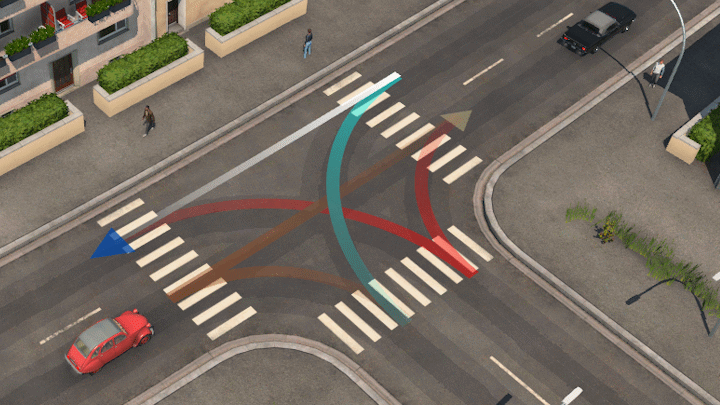
Select the junction with the Crossing tool. Its connections define permitted lane-to-lane turns. Identify the connection needed by your observed bus and check which outgoing lane it reaches. Compare that exit with the next piece of road, rather than assuming the vehicle will immediately change lanes after turning.
- Record or screenshot the existing connections.
- Change the one movement you are investigating, preserving a usable exit for vehicles that still need it.
- Close the tool and watch a newly approaching vehicle complete the turn.
- Inspect the receiving road: a clear junction entrance is not an improvement if the exit now fills immediately.
A controlled left-turn test
Suppose the outer lane crosses a straight-through lane to turn left. Test an arrangement that gives the required left turn an appropriate approach lane while retaining straight-through access. This is a layout experiment: the correct set depends on your actual junction and route directions.
Check both your bus and delivery service after editing. Removing a troublesome arrow may shorten one queue while making a cargo stop unreachable. If the line now reports a connection problem, restore the recorded movement and investigate a less restrictive arrangement.
When changing arrows is not enough
- Vehicle cannot reach the next stop: inspect the return movement and one-way road direction.
- Vehicles enter but cannot leave: examine the downstream queue before adding more entering movements.
- Only a particular light phase stalls: close construction and select the traffic light to inspect its phase membership separately.
- Only one old vehicle stays stuck: compare several later arrivals before judging the change.
Keep before/after observations of the same turn. A useful result is repeated completed turns without removing necessary access, not simply a screenshot with fewer cars. If a valid movement remains blocked, save the junction layout, build and active mods for a reproducible report.
Sources and version scope
Urban Games’ official manual supplies the documented controls. Original player discussion supplies the question and community observations. Community criticism motivates the audit; it does not establish a universal lane arrangement. Traffic-light timing and routing are separate controls. The diagnostic sequence is independently written; no personal gameplay test or guaranteed performance improvement is claimed. Screenshots are the developer’s instructional examples, not the forum author’s save.