Transport Fever 3 · Practical network management
Poor vehicle condition? Follow its route through maintenance coverage
On this page
Inspect Condition on the affected vehicle, then check the maintenance coverage its route actually passes through. A depot elsewhere on the map is not proof that this vehicle is receiving service.
Published October 19, 2026 · Vanilla PC controls · Sources checked October 19
Start at Condition, not at the purchase menu
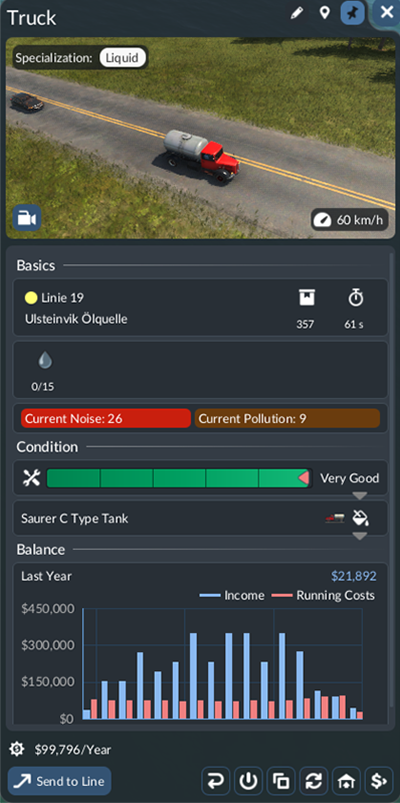
Select the vehicle and expand Condition. Keep its current service and location in view while inspecting the details. Write down the vehicle you are diagnosing: replacing another unit on the same line tells you nothing about this one's maintenance access.
Know which building you placed
Depots and shipyards combine vehicle purchasing with a small maintenance radius. Dedicated maintenance buildings cover passing vehicles over a larger radius but cannot sell you vehicles. Aircraft do not have a separate maintenance-building type in the documented system.
Check the actual path past the building. A road or railway may look close from above while the vehicle uses another branch. Follow a complete circuit, especially after a station or junction change. If only some vehicles on a service have poor condition, compare their observed paths and state instead of assuming every one needs replacement.
Test access before fleet replacement
- Record the affected vehicle's Condition and assigned line.
- Locate the intended servicing building and inspect its coverage.
- Watch the vehicle pass through the intended area.
- Revisit Condition and the maintenance details rather than judging the result from proximity alone.
If routing is the problem, fix the approach first. A new expensive vehicle using the same poorly served route does not establish that the underlying setup is repaired. If coverage is correct but the expected service still does not occur, record the building, vehicle, route and displayed state for a more specific investigation.
Check the operating consequence
Keep any replacement decision separate from this access test. You may still choose another model for capacity or another service requirement, but compare that purchase against the task it solves. There is no verified universal repair duration or ideal depot spacing in this guide.
Sources
Depot and maintenance-building functions; vehicle Condition panel, official manual. The inspection sequence and examples are editorial recommendations; no gameplay performance test or guaranteed gain is claimed.