Valheim · Save recovery · 1.0 conversion issue
Valheim item stands lost upgrades: choose the right backup recovery
On this page
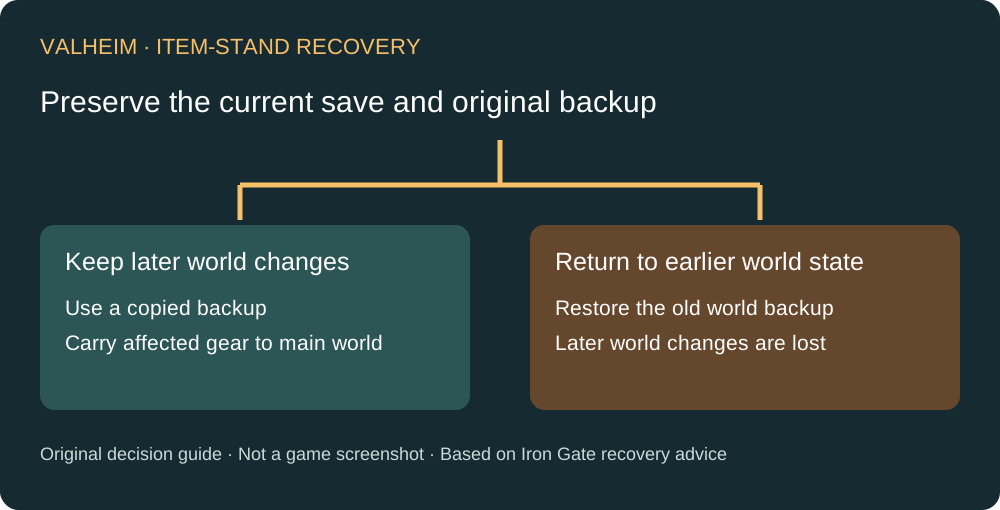
If equipment on an item or armor stand lost its upgrade level or variant during the original 1.0 conversion, updating prevents the fixed conversion bug from happening again; it does not recreate the lost data. Iron Gate documents two recovery routes: restore the conversion backup, or use a copy of that backup to retrieve the affected equipment on your character and bring it into your current world.
A whole-world rollback also removes later world changes. If those changes matter, investigate the copied-backup item-retrieval route first.
Published October 18, 2026 · Official recovery advice explained
Check a visual-only variant bug before recovery
Patch 1.0.16 separately fixes item variants not appearing correctly on item or armor stands. If the problem is how a shield looks while displayed, check that later fix before treating the variant as lost data and rolling back. A display error, a lost upgrade and a cheated-item label are three different symptoms.
First separate missing data from a warning label
Look at the item's actual level and appearance. A lost upgrade is a different symptom from an item being incorrectly labelled cheated. The October 15 patch separately resets erroneous cheated flags from previous versions. Do not roll a world back just because a label looks wrong: identify which problem you have before selecting a remedy.
Preserve the starting point
Before attempting either route, keep an untouched copy of the current world and the relevant older backup, and preserve the character you will use. This is our precaution for the recovery workflow. Give the working copy a distinguishable name and note which world contains your current buildings and progress. Never make your only surviving old backup the experiment.
Record a small inventory of affected equipment: name, expected upgrade, visible variant and where you found it. That list lets you verify a recovery rather than replacing unrelated items by mistake. If you cannot identify a suitable older backup, stop before overwriting the current save and ask official support about your situation.
Route A: retrieve equipment while keeping the current world
- Work from a copy of the relevant backup, leaving the original intact.
- Enter that backed-up world and check that the affected equipment still has the level or appearance you need.
- Put the affected equipment onto your character, following Iron Gate's documented workaround.
- Return to the current main world and replace the damaged items.
- Compare against your inventory notes before discarding any remaining recovery copies.
The key distinction is what you carry forward: selected equipment rather than the old world state. Do one identifiable item first so that you can check your understanding of the worlds and character involved. This is a verification recommendation, not an additional game mechanic.
Route B: roll the whole world back
The developer also permits reverting to the backup created at the first new-format load. Treat this as a deliberate choice to return to an earlier world state. Buildings, resource changes and other world progress after that backup are not retained by that rollback.
Before choosing it, ask everyone sharing the world whether the newer progress matters. A group that has built a new base has a different trade-off from someone who discovered the problem immediately after conversion. Keep the current-world copy even if you decide that the older state is preferable.
Checks before calling the recovery finished
- Are you back in the intended main world?
- Does the recovered item have the expected upgrade and variant?
- Are the newer buildings or other world changes you intended to preserve still present?
- Do the untouched backups remain available until you are satisfied?
Do not infer that a successful load proves all four. Inspect the equipment and world separately. Cloud, local and hosted-server save management can expose different controls; this guide does not invent one universal file path or ask you to delete saves.
Sources and limits
Iron Gate's September 18 Patch 1.0.15 notice explains the conversion loss, the preventive fix in 1.0.12 and both recovery routes. Its October 15 Patch 1.0.20 notice addresses erroneous cheated flags separately. Backup-preservation, item-list and completion checks above are editorial precautions. They do not guarantee recovery without a usable older copy. For an ambiguous save, use the developer's support entry.
Planning your next encounter after recovery? See Bonemass equipment and resistance preparation, or return to all Valheim guides.