Warhammer Survivors · PC / Steam Deck / Consoles · Hotfix v2.1.6
Save Location, Hotfix v2.1.6, Launch Crash & Steam Deck Fixes
On this page
- Exact Save File & Log Locations (Windows, Steam Cloud & Steam Deck)
- Steam Deck Verified Resolution Fix & Switch 2 Input Bug
- Hotfix v2.1.6 Full Summary & Console Rollout Schedule
- Platform Controller & Handheld Triage Matrix
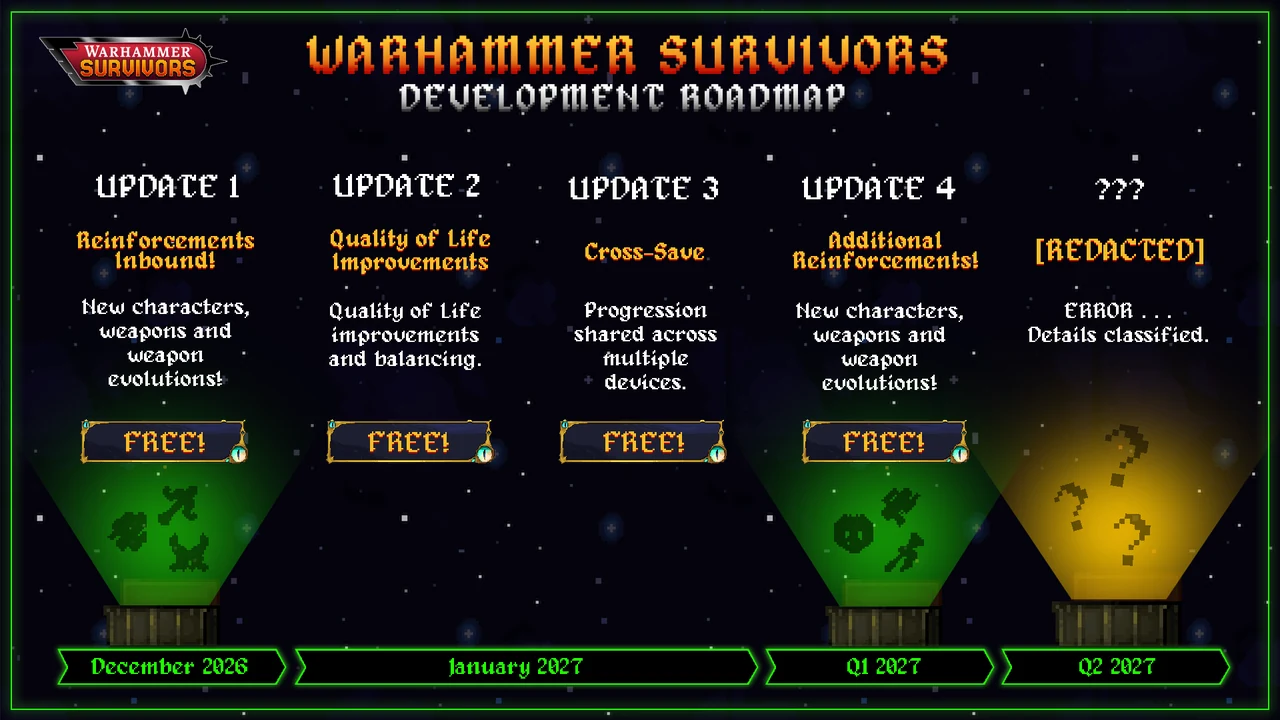
- Official 2026–2027 Free Post-Launch Roadmap & Cross-Save
- Frequently Asked Questions
- Sources & Build Verification
On Windows, Warhammer Survivors stores local saves and Player.log inside %USERPROFILE%\AppData\LocalLow\Auroch Digital\Warhammer Survivors. Auroch Digital confirmed that Demo saves never transfer to launch builds, mid-run progress only commits safely after returning to the Main Menu, and Windows Smart App Control causes Fatal error: Failed to load il2cpp crashes.
Between Windows 11 security false-positives blocking GameAssembly.dll, Steam Cloud save overwrites if you Alt+F4 mid-mission, and staggered Hotfix rollouts across consoles and GOG, most post-launch frustrations in Warhammer Survivors stem from client state rather than gameplay bugs. Auroch Digital documented these exact triggers across their official FAQ and Steam support thread (AppID 3669620).
Use this technical reference to back up local progression cleanly before testing Secrets codes, resolve il2cpp startup crashes, fix wrong aspect ratios on Steam Deck OLED, navigate Switch 2 Pro Controller menus, and check what landed in Hotfix v2.1.6 ahead of the January 2027 Cross-Save update. Looking for gameplay progression instead? Open our 40 weapon evolutions guide or Paint Pots & Parade Ready checklist.
Exact Save File & Log Locations (Windows, Steam Cloud & Steam Deck)
Because Warhammer Survivors runs on Unity’s IL2CPP runtime under Auroch Digital, save data, configuration preferences, and diagnostic crash logs live outside the Steam install directory:
| Platform / Purpose | Exact Directory Path | When to Inspect / Back Up |
|---|---|---|
| Windows Local Save & Logs | %USERPROFILE%\AppData\LocalLow\Auroch Digital\Warhammer Survivors |
Contains progression files and Player.log crash traces. Copy the whole folder to Desktop before resetting saves. |
| Steam Cloud Remote Cache | C:\Program Files (x86)\Steam\userdata\<SteamID>\3669620\remote |
Where Steam mirrors cloud-synced progression across Windows PCs and Steam Deck. |
| Steam Deck / Linux Proton | ~/.local/share/Steam/steamapps/compatdata/3669620/pfx/drive_c/users/steamuser/AppData/LocalLow/Auroch Digital/Warhammer Survivors/ |
Access via Desktop Mode Dolphin (enable Hidden Files) to rescue Steam Deck saves after offline runs. |
| Demo Save Transfers | Not Supported (Official Auroch FAQ) | Progress unlocked during the Steam Next Fest / pre-release Demo stays separate and cannot import into v1.0/v2.x builds. |
Storefront Editions, Demo Isolation & Safe Backup Routine
Since its November 10, 2026 launch (£6.39 / $7.99 / €7.49), Warhammer Survivors ships simultaneously on Steam, GOG, PlayStation 5, Xbox Series X|S, Day-1 Xbox Game Pass, Nintendo Switch 1 & 2, iOS, and Android. At launch, progression stays sandboxed by storefront ecosystem: Steam Deck and Windows share progress exclusively via Steam Cloud, whereas Game Pass PC, Console, and Mobile store progression locally inside separate containers until Cross-Save deploys in January 2027 (Update 3).
Players migrating from the pre-release demo often look for an import toggle inside Settings. Auroch Digital confirmed explicitly in their FAQ that Demo progression never moves into retail saves because early demo balance and unlock hooks diverged from release tables.
Before experimenting with endgame Secrets menu incantations or wiping corrupted cloud profiles, copy your active save folder out manually using these three steps:
- Back Up LocalLow Before Edits: Press Win+R, paste
%USERPROFILE%\AppData\LocalLow\Auroch Digital\Warhammer Survivors, copy the folder onto your Desktop, and record today’s date on the backup name. - Audit Proton Prefix Writes on SteamOS: Switch Steam Deck to Desktop Mode, enable hidden directories inside Dolphin, navigate to
compatdata/3669620/pfx/drive_c/users/steamuser/AppData/LocalLow/Auroch Digital/Warhammer Survivors/, and confirm free storage before large cloud overwrites. - Keep Demo Folders Separate: Uninstalling the Demo client leaves clean separation; never drop old demo data files inside the retail 3669620 save directory, as mismatched schema keys trigger silent fallback resets on boot.
Why Mid-Run Progress Disappears (and Safe Quit Protocol)
During November 2026 launch testing, players who killed the window mid-mission via Alt+F4 or crashed to Desktop lost Gold, Paint Pot kill counts, and rescued hero flags earned during that attempt. Current builds flush persistent progression to disk reliably only when returning to the Main Menu after mission clear, defeat, or Pause → Quit.
- Always Exit to Main Menu Before Closing: Never close the client straight from an active stage or end-of-run summary banner—click back into the Main Menu first so Steam Cloud receives a clean write timestamp.
- Fix Stuck Paint Pot Hero Unlocks: If Paint Pots displays a required color as owned but Castellan, Titus, or Mephiston stays locked on hero select, enter any stage for one second and quit out to force the save sync check.
- Clean Steam Cloud Conflict Recovery: Turn off Steam Cloud temporarily on Warhammer Survivors → copy your healthy
LocalLow\Auroch Digital\Warhammer Survivorsfolder aside → launch the game once to verify unlocks → exit to Main Menu → re-enable Steam Cloud and select Upload Local Files when prompted.
Fixing Launch Crashes: Fatal error: Failed to load il2cpp
If Steam opens a small error dialog reading Fatal error: Failed to load il2cpp on Windows 11 before the title splash appears, the culprit is Windows Smart App Control silently blocking Unity’s compiled binary (GameAssembly.dll) from loading into memory.
- Confirm in Windows Security: Open Start → Windows Security → App & browser control → Smart App Control settings. If Smart App Control is On, it blocks unsigned or newly patched game assemblies on launch.
- Switch Smart App Control Off (If Blocked): Setting Smart App Control to Off immediately restores
il2cpploading (note Windows requires a full Windows reset to toggle Smart App Control back to On later, so evaluate your personal machine policy before changing it; Microsoft’s Evaluation mode also clears automatically once Microsoft Defender trusts the binary). - Verify Integrity of Game Files: Right-click Warhammer Survivors in Steam → Properties → Installed Files → Verify integrity of game files so any quarantined .dll restores cleanly, and attach
Player.logfromLocalLowif contacting Auroch support.
Steam Deck Verified Resolution Fix & Switch 2 Input Bug
Although Warhammer Survivors carries Steam Deck Verified status alongside full DualSense/DualShock/Xbox controller support, Auroch Digital logged two platform-specific input and display quirks in their Known Issues tracker:
- Steam Deck Incorrect Resolution on Launch: Some handheld boots lock into an off-ratio or zoomed 1280×720/800×450 scale, cutting off left/right HUD cards or Main Menu buttons. Open the top-right gear Settings icon from the Main Menu, switch Resolution explicitly back to native 1280×800 (or 1920×1080 if docked), and confirm changes cleanly.
- Nintendo Switch Pro Controller D-Pad Broken on Switch 2: Playing Warhammer Survivors on Nintendo Switch 2 with an external Switch Pro Controller drops D-pad inputs inside UI menus. Until the console patch reaches Nintendo eShop, use the Left Analog Stick for all Main Menu, Enhancements, and chest selections (in-run movement stays responsive).
- Late-Wave Frame Pacing on Handhelds: During 20-minute Khorne Bloodcrusher, Skaven Under-Empire, or Limitless runs with Gift + Deathstrike Missile animations stacking, turning off floating damage numbers and lowering visual clutter in Settings preserves 60 FPS battery headroom on Steam Deck OLED.
Hotfix v2.1.6 Full Summary & Console Rollout Schedule
Hotfix v2.1.6 deployed to Steam on November 11, 2026, targeting the exact launch complaints raised on day one (GOG, PS5, Xbox Series X|S, Nintendo Switch 1 & 2, iOS, and Android are scheduled sequentially starting "from next week" due to platform certification):
| Area Fixed (Hotfix v2.1.6) | Before Patch (Launch Build) | After Patch (Steam v2.1.6) |
|---|---|---|
| Chest Animation Skip | Only Escape / Right-Click / B worked after finding each rarity once | Any button press cleanly skips repeated chest animations |
| Meganobz & Plague Marine Bosses | Extended invulnerability / impervious windows dragged boss kills out | Impervious duration reduced across both elite bosses |
| Paint Pot Grind Thresholds | 10,000 kills specifically on D6 Dice and Nuln Oil stalled Parade Ready | Required kill counts lowered for Reikland Fleshshade & Agrax Earthshade |
| Unreachable Map Chests | Select Imperial Bastion & Gallowdark boss chests spawned behind collision | Adjusted boss chest drop logic onto walkable terrain |
| The Legend of Catachan Bug | Equipped Chainsword incorrectly after Bastion rescue | Restored native Frag Grenade loadout |
| Mork’s Mighty Mushroom Bug | Poison cloud visual disappeared early while hitbox kept damaging players | Synchronized visual cloud despawn with actual damage tick box |
| Extremis Defeat Hint | Objective text failed to clarify how to trigger Extremis unlocks cleanly | Updated hints on Extremis Boss encounter/defeat gates |
Platform Controller & Handheld Triage Matrix
Launching across PC, PlayStation 5, Xbox Series X|S (plus Day-1 Game Pass), Nintendo Switch 1 & 2, iOS, and Android introduces distinct controller and display profiles. Check this quick diagnostic table if inputs freeze or screen margins clip HUD elements:
| Device / Platform | Known Issue / Symptom | Verified Workaround or Setting |
|---|---|---|
| Steam Deck OLED / LCD | Off-ratio resolution crops menu rails or edge pickup arrows | Open Main Menu Settings (Cog) → Resolution and select native 1280×800 (or 1920×1080 when docked). |
| Nintendo Switch 2 (Pro Controller) | D-Pad presses stop responding across menus and upgrade cards | Use the Left Analog Stick for menu choices and chests; in-stage movement works normally. |
| Windows PC (DualSense / DualShock) | Wrong button glyphs or double controller inputs on USB + Bluetooth | Steam build ships native PlayStation and Xbox prompt support—disable conflicting external mappers before launch. |
| Xbox Game Pass PC ↔ Steam | Progress from Game Pass / Console does not appear on Steam | Separate storefront saves stay siloed until Update 3 (January 2027) delivers full Cross-Save. |
Reading Player.log When Troubleshooting Support Tickets
Before emailing support or wiping your install on Windows, open %USERPROFILE%\AppData\LocalLow\Auroch Digital\Warhammer Survivors\Player.log in Notepad right after a crash occurs. Scan the final 30 lines for two distinct signatures:
- Blocked Binary Signatures: Lines mentioning
Failed to load il2cppor missingGameAssembly.dllpoint directly to Windows Smart App Control or third-party antivirus quarantine rather than corrupted Unity scenes. - Missing Save Serialization Flags: If gold, rescued heroes, or Paint Pots fail to stick despite reaching the Main Menu, check file timestamps inside the same folder against Windows Controlled Folder Access policies so the user account owns write permissions to
LocalLow. - How Hotfix v2.1.6 Improved Late-Run Pacing: Shortening Meganob and Death Guard Plague Marine impervious phases eliminates multi-second invulnerability stalls during timed survival runs, while replacing Escape/Right-Click/B chest skipping with any button press keeps back-to-back boss chest drops fast on both mouse and gamepad.
Official 2026–2027 Free Post-Launch Roadmap & Cross-Save
On November 13, 2026, Auroch Digital published the post-launch content timeline covering free expansions across every version (PC, Game Pass, PS5, Switch 1/2, and Mobile). Planning your resource grind around these milestones keeps major progression updates aligned:
- Update 1 — December 2026 (Free): Adds new playable Characters, Weapons, and Weapon Evolutions across both universes.
- Update 2 — January 2027 (Free): Core Quality of Life upgrades and balance tuning across stages, bosses, and weapons.
- Update 3 — January 2027 (Free): Introduces full Cross-Save so unlocked roster progress, Paint Pots, and Relics transfer directly between PC (Steam/Game Pass), consoles, and mobile.
- Update 4 — Q1 2027 (Free): Second major content drop adding extra champions, weapons, and evolutions.
- ??? [REDACTED] — Q2 2027: Teased major unannounced expansion scheduled for mid-2027.
Frequently Asked Questions
Where are Warhammer Survivors save files and logs located on Windows and Steam Deck?
On Windows, open %USERPROFILE%\AppData\LocalLow\Auroch Digital\Warhammer Survivors for saves and Player.log, plus Steam\userdata\<SteamID>\3669620\remote for Cloud cache. On Steam Deck, check Proton compatdata ID 3669620 under drive_c/users/steamuser/AppData/LocalLow/Auroch Digital/Warhammer Survivors/.
Why did my Gold, Paint Pots, or rescued characters disappear after quitting?
Closing the game via Alt+F4 mid-run prevents a proper progression write; return cleanly to the Main Menu after any run ends. Remember that Steam Next Fest Demo progress never carries forward to the full game, and Paint Pot unlocks that show green without unlocking a hero fix themselves by launching and quitting a fresh stage.
How do I stop the Fatal error: Failed to load il2cpp startup crash on Windows 11?
Disable Windows Smart App Control (under Windows Security → App & browser control) if it is quarantining GameAssembly.dll, then verify local files on Steam under Properties → Installed Files.
Why isn’t Hotfix v2.1.6 live on Game Pass, PS5, Xbox, or Switch 2 yet?
Auroch Digital pushed Hotfix v2.1.6 directly to Steam on November 11, 2026, while GOG, PlayStation 5, Xbox Series X|S, Switch 1 & 2, iOS, and Android roll out sequentially from the following week as console and storefront certifications complete.
Can I carry my Steam progress to Xbox Game Pass, Switch 2, or iOS right now?
Not at launch—currently only Steam Cloud shares saves between Windows PC and Steam Deck. Full cross-platform Cross-Save arrives free in Update 3 (January 2027) per the November 13 official roadmap.
Sources & Build Verification
Every evolution requirement, secret incantation, rescue trigger, Paint Pot threshold, and hotfix change above was cross-checked against Steam Build 26581996 data, Auroch Digital’s Steam release and Hotfix v2.1.6 announcements, and the official support FAQ (Auroch Digital Warhammer Survivors FAQ · Official Steam Known Issues (Auroch Matty) · Hotfix v2.1.6 & November 13 Roadmap).
All Warhammer Survivors guides → · Warhammer 40,000: Boltgun 2 guides → · Browse all game hubs →