CS2 · Mouse settings · Source reviewed October 16, 2026
CS2 eDPI calculator
On this page
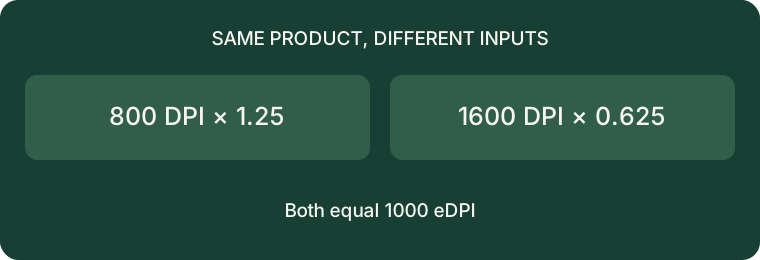
Multiply your mouse DPI by your CS2 sensitivity to calculate eDPI. To keep that number when changing DPI, divide your old eDPI by your new DPI. For example, 800 DPI × 1.25 sensitivity = 1,000 eDPI; at 1,600 DPI, the equivalent sensitivity is 0.625.
eDPI compares sensitivity settings within the same game. It is not a direct conversion between games. This definition follows ProSettings’ explanation of DPI and eDPI. The examples, calculator and diagram below are our own arithmetic, not professional-player settings or gameplay measurements.
Calculate your replacement sensitivity
Three worked examples
These inputs are deliberately chosen examples, not recommendations. Start with the product on the left, then divide it by the replacement DPI. Keep additional decimal places until you enter the final setting.
- 400 × 2 = 800. At 800 DPI, use 800 ÷ 800 = 1.
- 800 × 1.25 = 1,000. At 1,600 DPI, use 1,000 ÷ 1,600 = 0.625.
- 1,600 × 0.7 = 1,120. At 800 DPI, use 1,120 ÷ 800 = 1.4.
A practical change log
Before changing anything, write down your active mouse profile, its DPI and the sensitivity shown in CS2. Calculate the replacement value, enter the new pair, and keep the old pair in your notes so you can restore it. For a comparison, use the same mouse, surface and normal unzoomed view. Treat any result as a check on your setup rather than proof that an eDPI number makes you aim better.
A useful record is: “Old: 800 / 1.25. New: 1600 / 0.625. Same product: 1000.” If the new setup feels different, first check whether the intended mouse profile is active and whether you entered the decimal correctly. Avoid changing several other settings during the comparison: that makes it harder to identify which change you are noticing.
Why copying only a sensitivity number is incomplete
Compare two hypothetical players: one enters 1.25 at 800 DPI, while another enters 1.25 at 1,600 DPI. Their products are 1,000 and 2,000. The second product is twice the first, despite the identical sensitivity field. Ask for both inputs when comparing settings.
What this calculator does not answer
It does not choose a best sensitivity, measure input latency, calculate scoped sensitivity, or convert CS2 settings into another game. Its output is only multiplication and division. A correct product also does not establish that two different mice have identical physical tracking. For display responsiveness, read our separate G-SYNC, V-Sync and Reflex guide.
Method: source-based explanation plus independently calculated examples. No CS2 gameplay test or hardware benchmark is claimed. All calculator inputs stay in your browser.