Enshrouded · Sparkworks
Enshrouded Sparkworks Trapdoor Bridge: Start, Stop & Timing
On this page
Keep the start/end control section before the Clock. The start area reaches Upper through Hold 0.1s; both areas reach Lower through OR. Downstream, Clock 3s splits into two phases with Hold 0.7s, while the shared stop branch joins both output ORs. The final NOT nodes feed A/C together and B separately.
Mark the approach, finish and three floor sections
Build the crossing with three individually assigned trapdoor sections. Name them A, B and C in walking order, then place one Trigger Area at the approach and another at the landing. The two outer trapdoors share an output branch in this example; the middle section has its own branch.
Keep a permanent walking surface beside the bridge while editing. You need to reach both trigger areas and inspect every floor section without repeatedly falling through an unfinished circuit. Once the mechanism works, test the intended route across the trapdoors themselves. Remove temporary access only after the start, finish and idle states all behave as intended.
Use the Sparkworks Tool to identify the two detection volumes. Fit the start area around the approach rather than across the whole bridge. Put the end area on the far landing, where a player who has completed the crossing will enter it. Overlapping volumes make a start/stop test difficult to interpret because both can respond to the same movement.
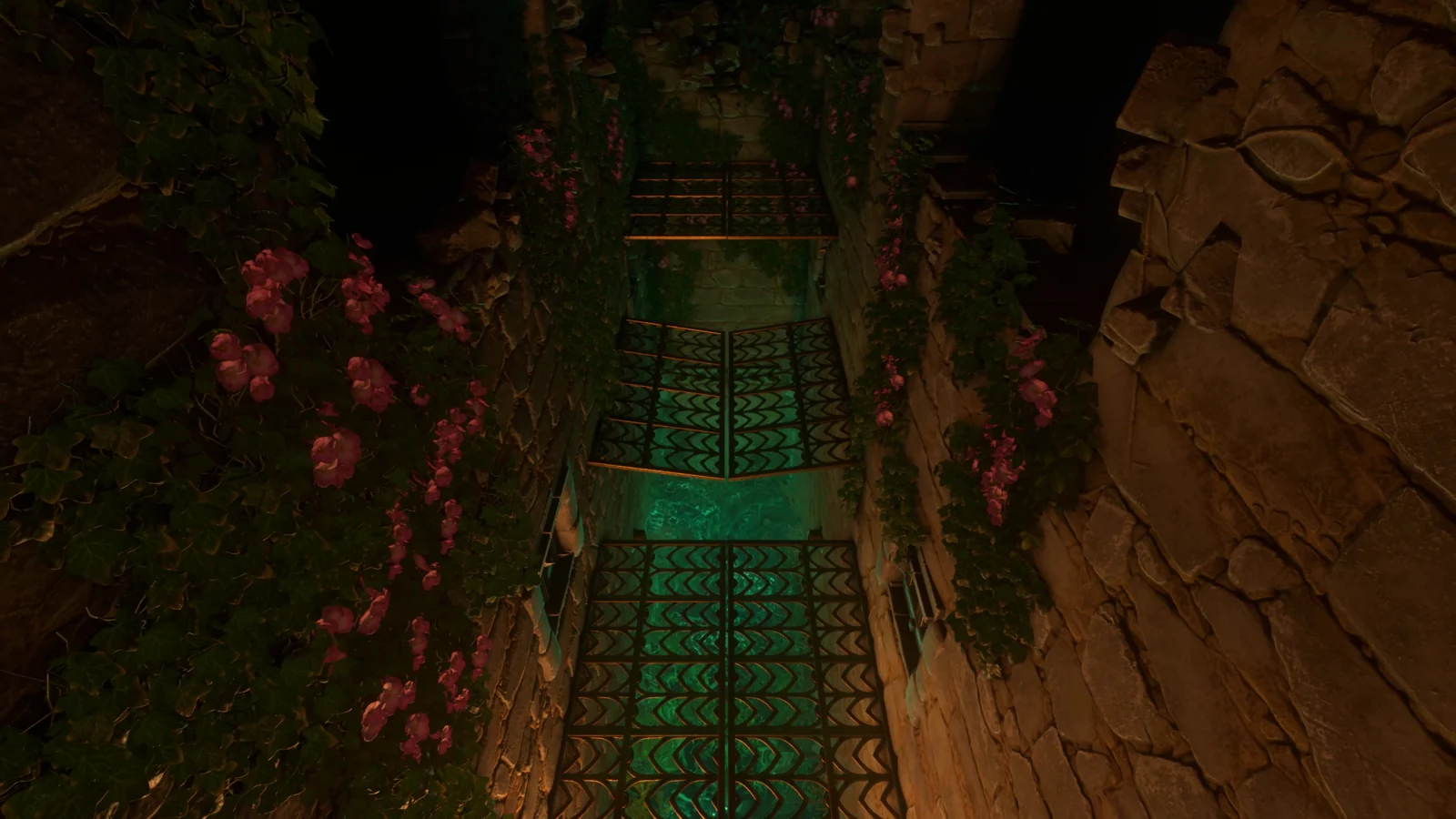
Reproduce the start/end input section
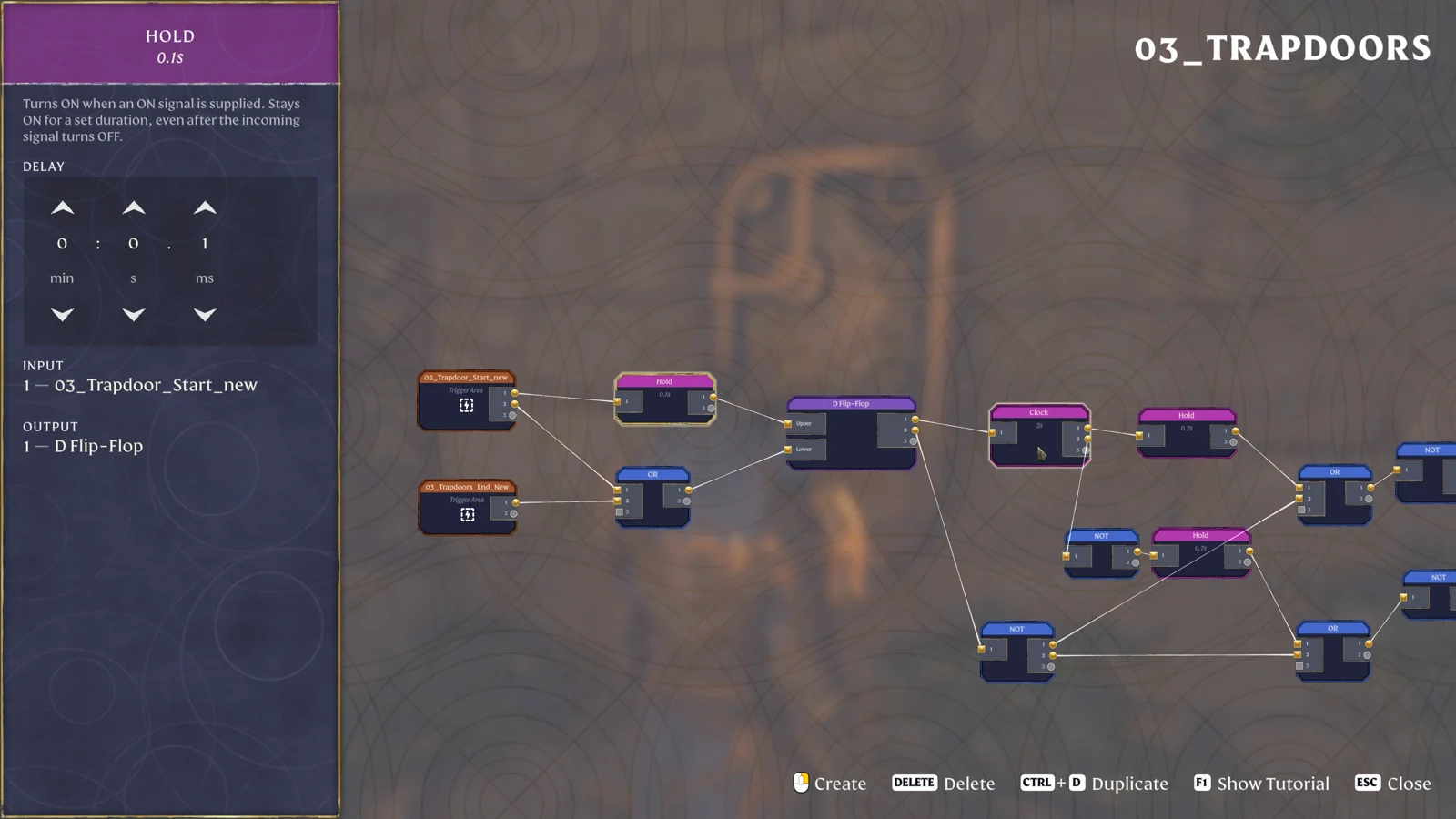
In the graph, the start area has two outgoing routes. One passes through Hold 0.1s into the D Flip-Flop’s Upper input. The other runs into an OR node, whose output reaches Lower. Connect the end area to another input on that same OR.
Follow each line to its actual port before continuing. The upper Hold, the OR below it and the two labelled inputs are all part of the pictured circuit. A shortened drawing containing only two areas and one OR leaves out the state-control section that sits between the triggers and the timed floor.
| Signal source | Intermediate node | Destination |
|---|---|---|
| Start Trigger Area | Hold 0.1s | D Flip-Flop Upper |
| Start Trigger Area | OR | D Flip-Flop Lower |
| End Trigger Area | The same OR | D Flip-Flop Lower |
Test the volumes separately before wiring the trapdoor outputs. Walk into the start, leave it, then cross into the end. Watch which object node responds. If the wrong area activates, fix its placement or assignment first. Changing the Clock interval will have no effect on a trigger volume that never detects the intended approach.
Split the Clock into opposite timed branches
Connect the D Flip-Flop output to Clock 3s. Take one Clock output directly into Hold 0.7s. Take another through NOT and then into a second Hold 0.7s. Place these two paths one above the other so that their single difference—the NOT before the lower Hold—is visible.
Each branch then reaches its own OR and final NOT before the trapdoors. The upper final output connects to A and C. The lower final output connects to B. Keep both final NOT nodes in place: the inversion before a Hold selects the opposite Clock phase, whereas the inversions after the ORs determine the signals delivered to the floor.
The three-second Clock value is the interval between ON/OFF changes shown by its tooltip. A complete pair of changes therefore spans six seconds. The 0.7-second Holds add their own behavior to each phase. Watch the finished floor to judge the crossing; the Clock’s number alone does not describe the full time a particular panel remains passable.
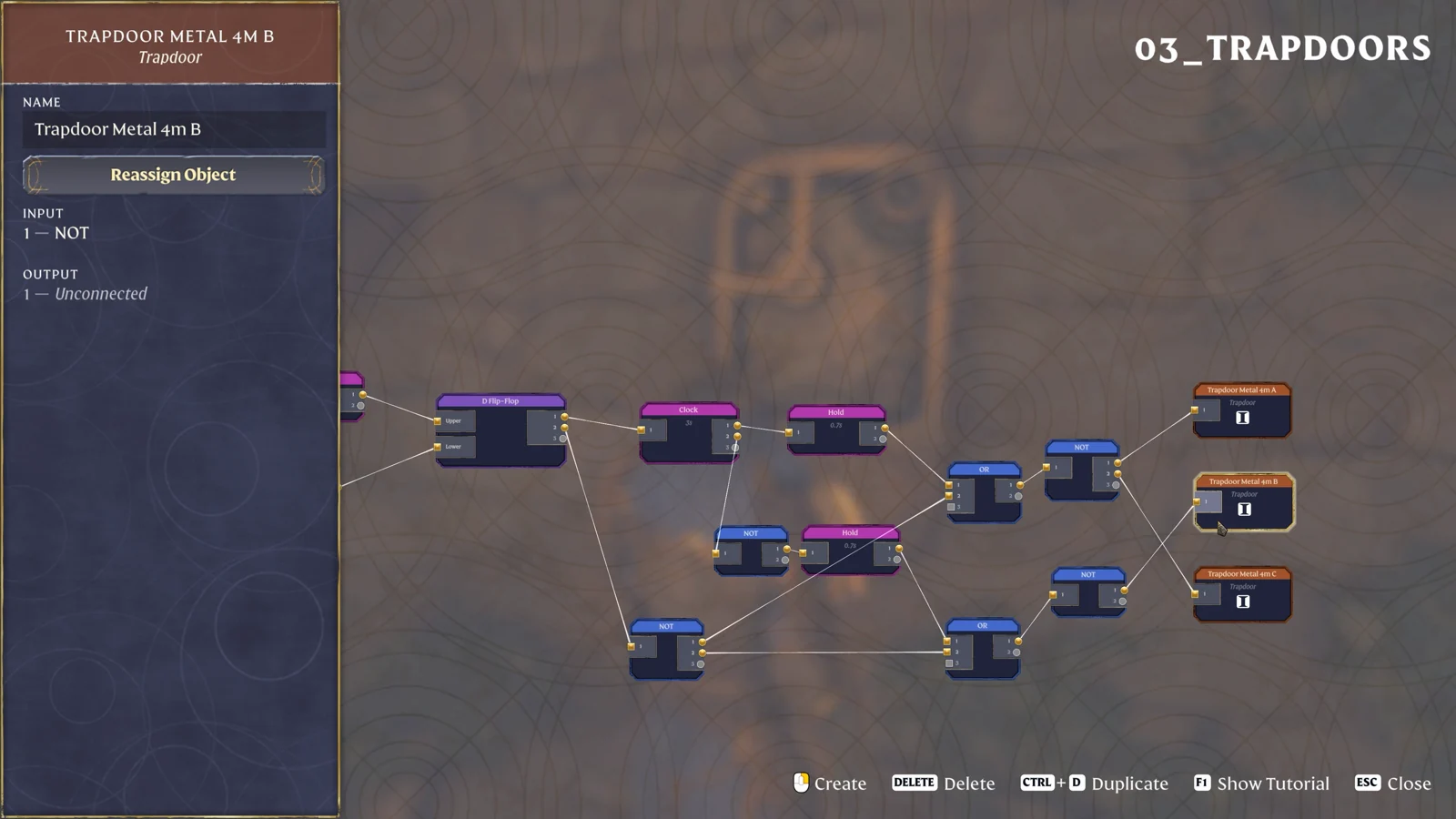
When reassigning the floor outputs, stand beside A, then B, then C and match each to its name. Both wires leaving the upper final NOT should end at A and C, with no connection to B. The lower final NOT should end at B. This physical check catches a bridge that looks correct in the editor but alternates the wrong two sections.
Repeat the same approach after correcting an assignment. Watch the nearest panel first, then the middle, then the far panel. Write down which pair moves together before changing a timer. That observation tells you whether to repair the A/C grouping or adjust the pace of an already correct pattern.
Connect the shared stop branch to both outputs
Another output from the D Flip-Flop passes through NOT and joins both output OR nodes. This is the common branch beneath the Clock paths. Trace it to both ORs, including the lower one: omitting one connection leaves the two trapdoor groups responding to different stop conditions.
It helps to compare the layout in three passes. First check the trigger-to-D-Flip-Flop connections. Next inspect the Clock and the two 0.7-second Holds. Finally inspect this shared branch and the two final NOT nodes. You can then follow any unexpected movement back through a small section rather than scanning every crossing line at once.
- Finish the shared NOT connection to the upper output OR.
- Connect the same shared branch to the lower output OR.
- Confirm that each OR reaches its own final NOT.
- Check A/C on one output and B on the other.
- Run from the start area to the finish area and observe both groups after arrival.
Check idle, crossing and finish states
Start from the near landing with no player standing in either area. Look at all three floor sections before entering. Cross the start volume, then watch the two groups alternate. After reaching the far landing, continue far enough to enter the end volume completely and check whether the mechanism has stopped as intended.
If one panel keeps cycling, inspect its final output branch and the shared stop wire. If every panel cycles correctly but reaching the far end changes nothing, inspect the end Trigger Area and its link to the input OR. Keep the two observations separate: a missed finish trigger and a wrong floor assignment require changes in different parts of the graph.
| Symptom | First connection to check |
|---|---|
| A and C move differently | Their shared final NOT and physical object assignments |
| B follows the same phase as A/C | The NOT before B’s 0.7s Hold and its final output |
| The far landing does not stop the puzzle | End area → OR → Lower |
| Only one group responds to stopping | The shared stop branch into both output ORs |
Once the complete start-to-finish sequence works, adjust one duration for your own route and repeat that full sequence. Keep a copy of the original three values in your notes so that you can restore the example. For a shorter plate-triggered crossing, use the five-second spike hallway, which has fewer state-control connections.
Sources
Keen Games: Introducing Sparkworks · Official gameplay footage · Trapdoor Metal 4m.