Factorio · Generic cargo trains · Item wildcard
Generic cargo interrupt: make the destination name match the cargo
On this page
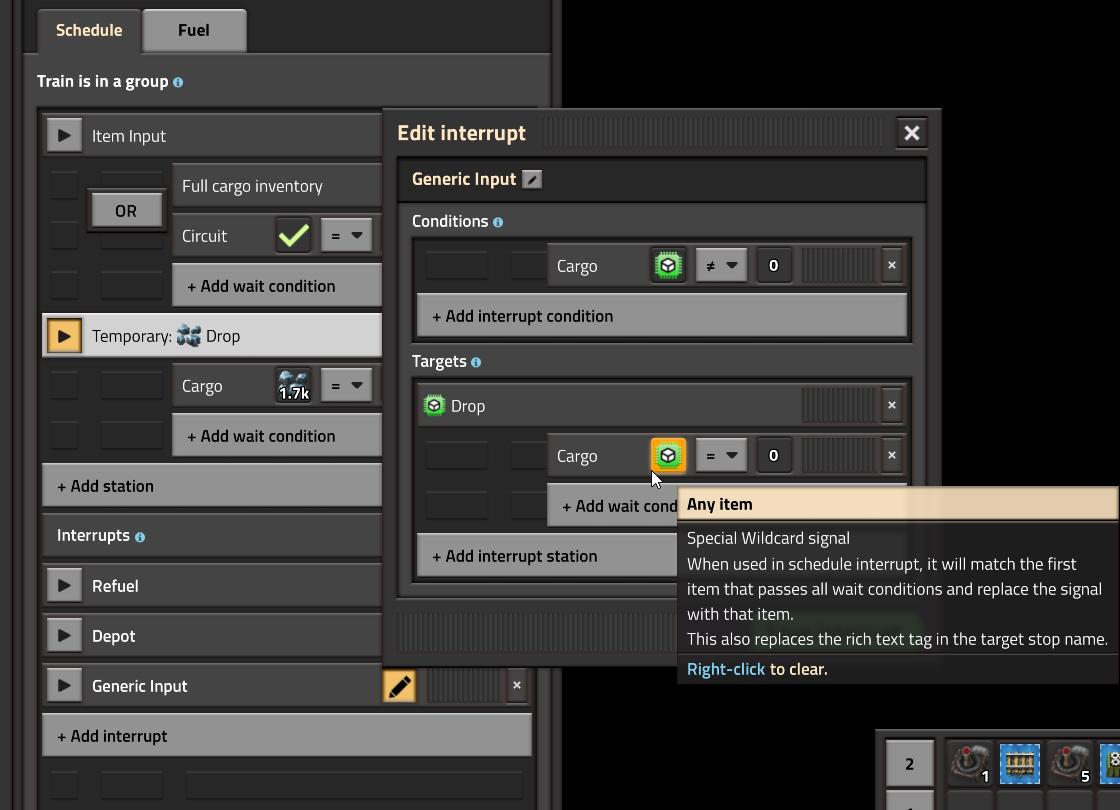
Put the item wildcard in both the cargo condition and the destination-name template. The matching item replaces that wildcard. The resulting name must match a real stop, including its item icon and remaining text.
Build one working route before generalizing it
- Choose one test cargo, such as iron ore. Provide a loader and an unloader that can handle it.
- Name its unloading stop using the iron-ore item icon, followed by your chosen suffix, such as Drop.
- In the train’s interrupt, choose the item wildcard for a cargo-is-not-zero condition.
- In its target-name template, insert the same wildcard icon followed by the identical suffix.
- Use the matching cargo-zero wait condition so the temporary delivery finishes when that cargo has been unloaded.
The screenshot shows where the special icon belongs. An ordinary word such as “iron” in a station name is not the same as an iron-ore item icon. Factorio rich text supports item tags such as [item=iron-ore]; use the interface’s icon picker if that makes the name easier to inspect.
Trace the name in both directions
For the one-cargo example, read the rule as: “I carry iron ore; replace the wildcard with the iron-ore icon; find the stop with that icon plus Drop.” Compare that complete output with the real unloading stop. Change one field at a time so a misspelled suffix does not get confused with a rail problem.
Then repeat with copper ore and a matching copper-ore unloading stop. If the first route works but the second does not, compare the two stop names and unloading arrangements before rebuilding the common rail network.
Common mismatches
- The condition finds cargo but the destination is missing: the generated name has no matching stop. Correct the icon or text.
- An item wildcard is used for fluid routing: item and fluid parameters inspect different inventories. Use the parameter appropriate to the cargo.
- A mixed load takes an unexpected delivery first: the wildcard selects a passing item; it is not an instruction to satisfy every item simultaneously. Start with one cargo type per diagnostic trip.
- The name matches but the train still waits: check stop capacity and the physical route separately.
Generic routing reduces duplicated schedules; it does not build missing unloading infrastructure. Add another cargo only when you can identify its generated destination and observe an unload condition that can actually complete.
Related railway checks
Destination and route checks · Refueling checks · All Factorio guides
Sources and version
Published October 18, 2026. Source-based explanation of PC 2.0-era railway controls, checked against the official references on this date. Developer wildcard demonstration · Official wildcard inventory and matching rules · Item rich-text syntax. Examples below the pictured settings are our diagnostic recommendations, not measured throughput results. Images are used under Wube’s website-asset guidance. Official game and demo.