Factorio · Railway troubleshooting · 2.0 base-game mechanics
Train says Destination full or No path? Fix the right problem
On this page
Destination full: check the stop’s train limit, reservations and circuit enable condition. No path: check that the named stop exists and the train has a legal rail route to it. A depot interrupt can move an idle train out of the way, but it cannot create a missing destination or repair a broken track.
Published October 18, 2026 · PC 2.0 railway reference · Space Age is not required for schedule interrupts
1. Read the destination before rebuilding the junction
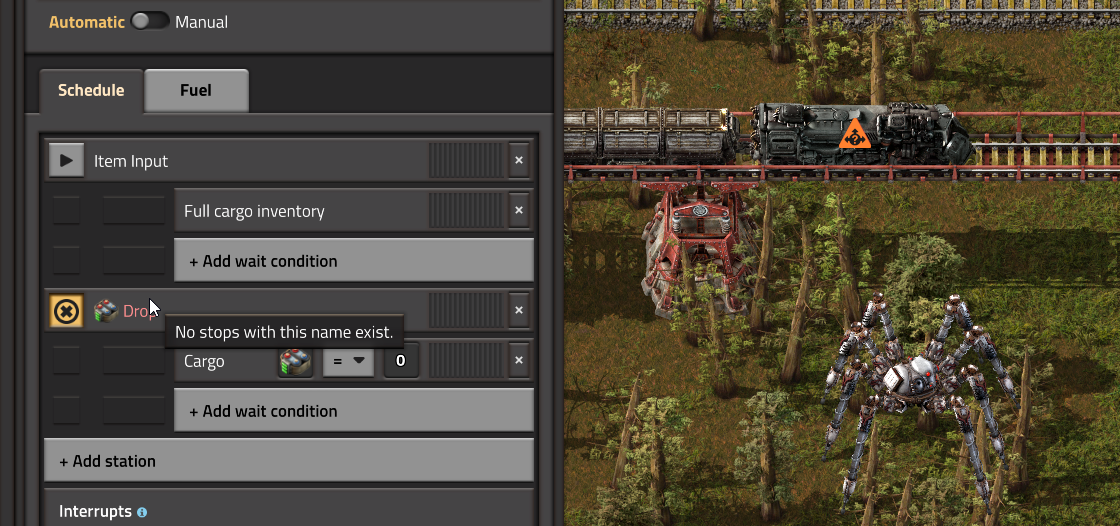
Open the locomotive schedule and identify the destination it is trying to reach, including a temporary stop inserted by an interrupt. Check the actual stop name, not just the outpost you intended. Item icons can be part of a station name.
In 2.0, a nonexistent scheduled stop produces No path. Disabling a stop instead behaves like setting its train limit to zero: a newly dispatched train waits for availability. A train already travelling there can still finish its visit. Repeatedly toggling the circuit condition is therefore a poor way to diagnose the route.
2. For Destination full, count reservations—not empty platforms
- Open a stop with the scheduled name and inspect its train limit.
- Check trains already assigned to that stop, including an approaching train and a train parked there.
- Inspect the circuit condition if the stop is disabled or its limit is controlled by signals.
- Check other enabled stops sharing that exact name before changing the network.
Example: a stop with limit 1 can look empty while one approaching train has already reserved its capacity. A second train waiting is expected. Increasing the limit is appropriate only if the station and its waiting tracks can physically accommodate another train; otherwise it relocates the queue onto your main line.
Reducing a limit does not cancel trains already committed to that stop. Judge the result after those visits complete.
3. For No path, test the route in order
First confirm that a stop with the scheduled name actually exists. Then inspect track continuity, the arrival direction and signal orientation. A stop must be on the right side of the train’s arrival direction. On a two-way section, unmatched directional signals can prevent the return route.
Use the locomotive’s map and hold Control while hovering along the intended rails to inspect the path preview. Follow it from the train toward the target; the point where it disappears narrows the search for a missing rail or directional restriction. Do not remove every signal just because a train is stationary.
4. Add a depot only after the destination works
Keep one pickup and one drop-off working before introducing a parking rule. The developer’s depot example uses Destination full or no path AND Empty cargo inventory, then sends the train to a temporary Depot stop with a 30-second wait. That cargo guard matters: this particular example is for empty trains, not a universal solution for loaded trains.
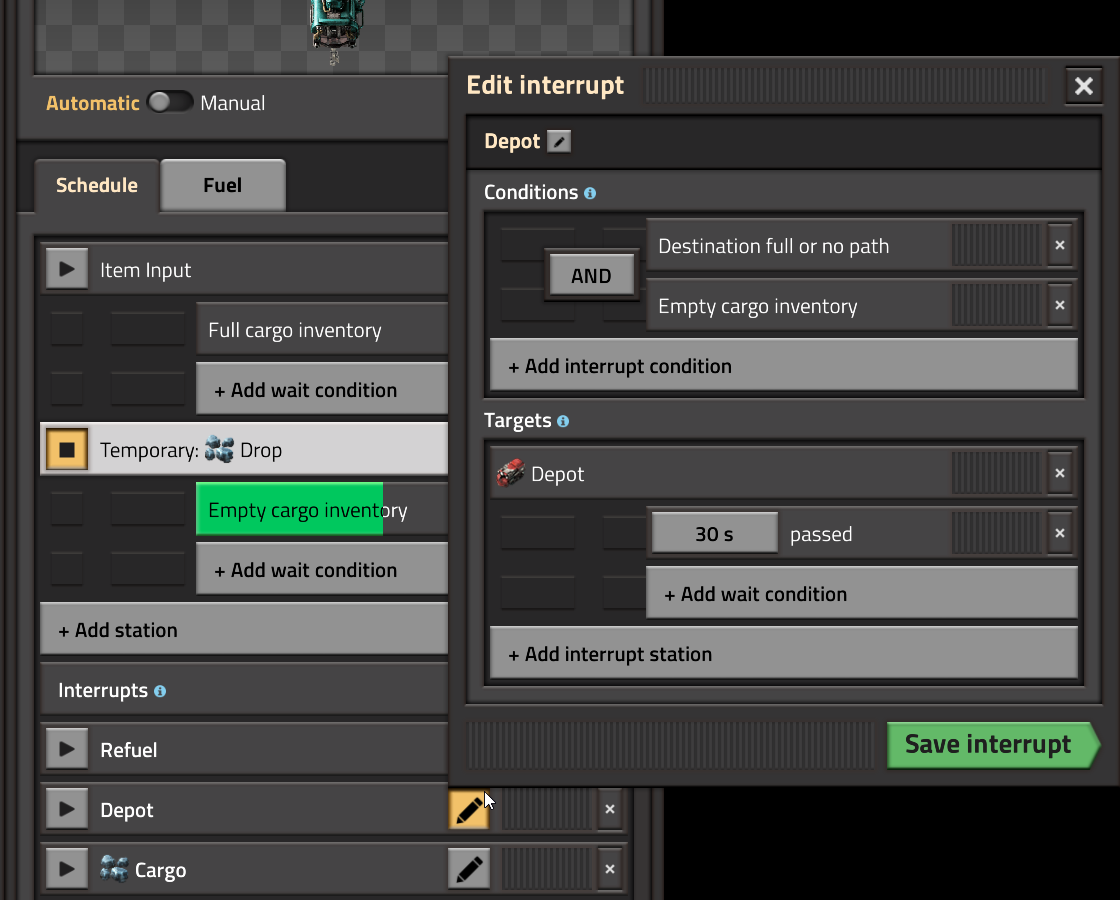
An interrupt temporarily adds destinations; it does not permanently replace the original route. Make the Depot reachable and give it enough physical parking space. If the original problem remains after waiting, return to the named destination and capacity checks rather than adding more interrupts.
What success looks like
- A waiting train departs when an eligible destination becomes available.
- A corrected destination name resolves the missing-stop error.
- A repaired legal route appears in the path preview.
- An empty idle train can park without occupying the loading stop.
Continue with refueling checks, generic cargo routing or priority versus train limits. All Factorio guides →
Sources, version and images
Mechanics checked October 18, 2026 against the official Train stop reference, Railway reference, pathfinding reference and Wube’s linked development articles. This is an independently written source-based troubleshooting sequence. The screenshots predate release and identify the controls, not every later interface detail. Wube’s press-kit guidance permits website assets for coverage. Visit the official Factorio website for the game and demo.