Factorio · Shared railway settings · PC 2.0-era controls
Why did editing one train change the others?
On this page
A train group shares its schedule. A named interrupt can also be shared across trains, even across different groups. Leaving a group isolates schedule edits; it does not by itself make every referenced interrupt private.
First identify what changed
If regular pickup and drop-off stops changed together, inspect group membership. If a Refuel condition or its target changed on several routes, inspect whether they use the same named interrupt. Do not restore stops on every train independently before identifying the shared setting; that can spread another edit.
Isolate a diagnostic train
- Record the intended regular route and interrupt names before editing.
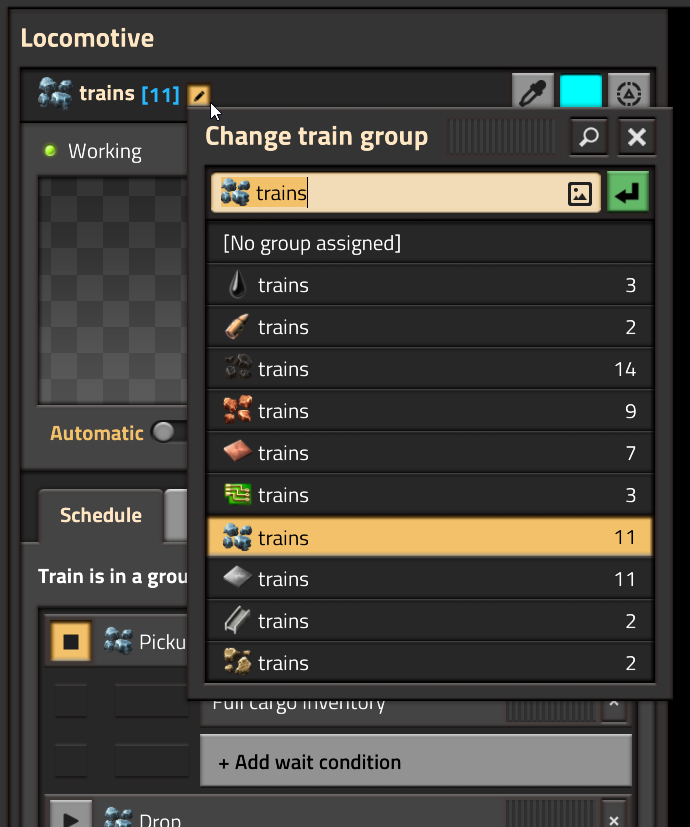
- Open the train’s group selector. Wube’s pictured interface places it by the group name and offers No group assigned.
- Remove the diagnostic train from the group before changing its regular schedule.
- For interrupt experiments, create a separately named interrupt with the intended conditions and targets. Avoid editing the original shared name.
- Change one condition, observe one trip, and compare the other trains’ schedules before distributing the result.
This is a conservative editing workflow: it makes the scope of your change visible. It does not imply that an ungrouped train has different rail-path or fuel mechanics.
Temporary orders are a third category
A temporary destination is part of an individual train’s current activity. Wube describes group schedule updates as excluding temporary stops. Keep a one-off order distinct from the regular schedule you intend the fleet to follow; a train’s current destination alone does not prove that every group member received a new permanent route.
Return the corrected rule to service
Check a pickup, a delivery and any refueling detour. Then decide whether the group should receive the tested schedule or whether this train performs a genuinely different job. Give groups functional names that distinguish cargo and train layout. Before editing a shared interrupt again, check which routes depend on it.
Sources and scope
Published October 18, 2026. Official references checked on this date: Developer group and global-interrupt design · Current group and interrupt reference. This is an independently written source-based guide; examples are diagnostic setups, not performance measurements. Website assets used under Wube’s press guidance. Official game.
Refuel debugging · Cargo wildcard routes · All Factorio guides