PUBG: BATTLEGROUNDS · PC 43.2 · Markers
PUBG item markers disappearing? Check the 300m rule before changing settings
On this page
Update 43.2 limits world-displayed item markers to 300 metres. Care Packages, deathboxes, vending machines and Loot Truck crates use world markers instead. The new Message Radial page 2 and page 3 shortcuts also start without assigned keys.
Published October 17, 2026 · PC update released October 14. Console update is scheduled for October 22 and is not treated as live here.
First identify what kind of marker disappeared
The 300m note concerns item markers displayed in the world. It is not a statement that all map navigation, teammates and every marked object vanish at the same distance. Diagnose the category before treating the result as a broken key binding.
| What you marked or are looking for | 43.2 distinction | Useful next check |
|---|---|---|
| An ordinary item marker in the world view | Visible within 300m | Check the distance before assuming the ping failed. |
| Care Package, deathbox, vending machine or Loot Truck crate | Uses a world marker instead of an item marker | Do not apply the item-marker explanation indiscriminately. |
| A marker or teammate outside the current World Map view | An off-screen marker feature was added | Distinguish outside the visible map area from a missing world item marker. |
| A direct shortcut to radial page 2 or 3 | No default key is assigned | Assign that action before expecting the shortcut to work. |
Assign the new message pages explicitly
- On the PC version, open Settings → Key Bindings → Interface → Radial.
- Identify Message Radial - Page 1. The update renames the existing shortcut to that action and retains its previous binding.
- Choose keys for Message Radial - Page 2 and Message Radial - Page 3 if you want direct access. Use bindings that do not create an unwanted conflict in your own layout.
- Check each assigned page before a match. A working page 1 shortcut does not establish that the other pages have been assigned.
Do not reset the entire control profile merely because one new page does not open. Start with the individual action that is missing. That keeps a small configuration issue from overwriting unrelated aim, movement or inventory preferences.
Two messages changed, so check the selected meaning
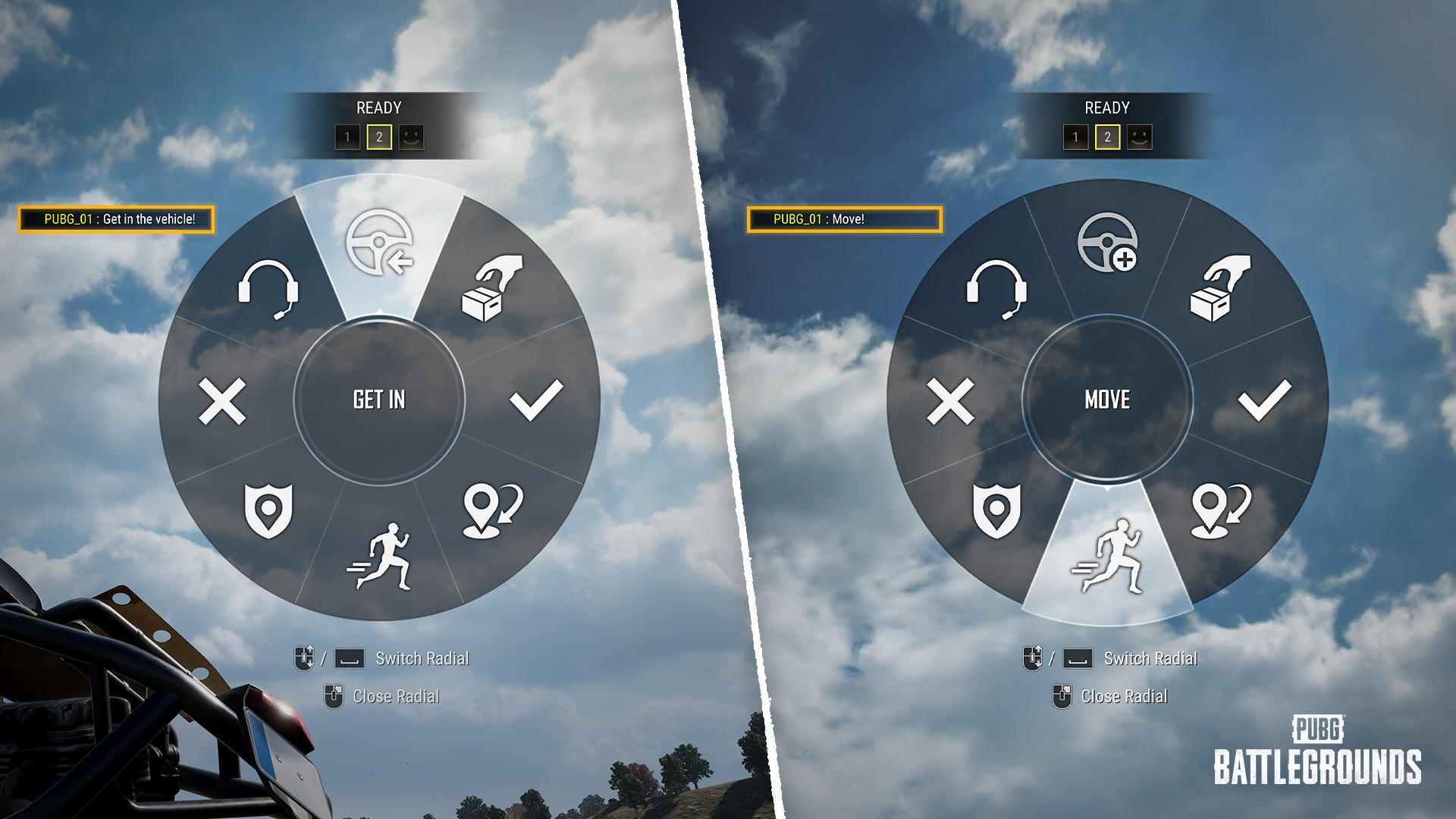
The update adds a vehicle-boarding request and changes the previous Thank You message to a movement request. The official illustration above identifies “Get in the vehicle!” and “Move!” as distinct selections.
Our practical recommendation is to check the label rather than choosing a familiar wheel position from memory. If your squad hears an unexpected instruction, confirm what you selected before diagnosing a microphone or network fault. The message’s meaning matters independently of whether a marker appeared.
A short troubleshooting order
Wrong object category → wrong distance expectation → unassigned page → wrong selected message. Work through those possibilities separately. For a reproducible failure report, retain the platform, installed update, object type, approximate distance and action used.
A new option appearing in patch notes does not establish that an older client has it. On October 17, the published console maintenance date is still in the future. Console users should compare their platform’s release status before expecting the PC 43.2 behavior.
Sources and next step
KRAFTON’s Update 43.2 patch notes, published October 13, 2026, supply the limits, binding path, message changes and platform schedule. The diagnostic order is original editorial guidance, not a measured connection test.
For another easily confused control, see Hybrid Scope 1x/4x switching and grip choices. PUBG guide index →