Transport Fever 3 · New and cloned vehicles · Depot access
A cloned train cannot join the line? Locate its depot first
On this page
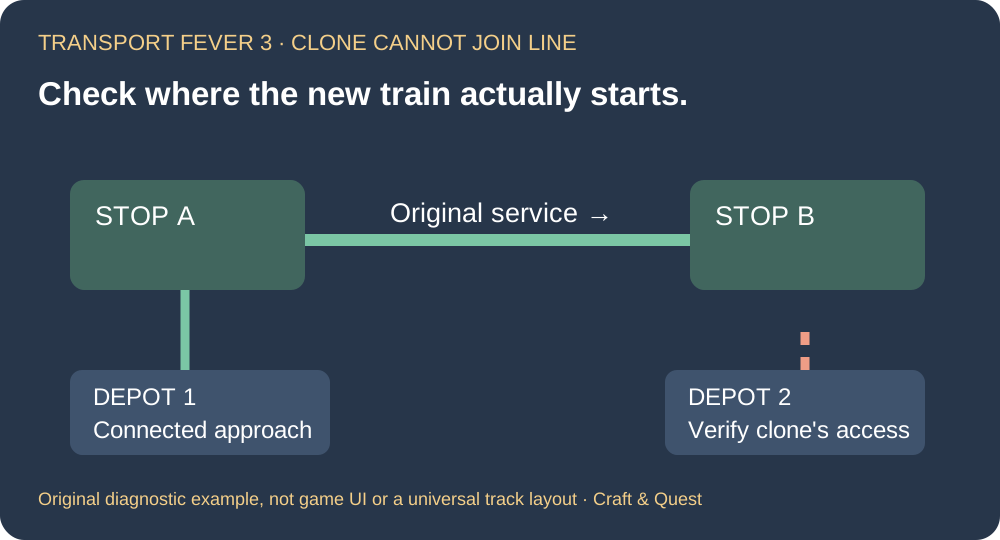
A working original train does not prove that its clone can reach the service. The developer's manual warns that cloning creates a vehicle in a compatible depot which may not be connected to the original line. Inspect the new vehicle's actual location and intended first stop before rebuilding the railway.
Published October 18, 2026 · Sources checked October 18 · PC line-management workflow
See the clone operation
SeniacTWO's Alpine Crossing playthrough, clone step at 24:41, published September 24, 2026. This is a creator preview from before the September 29 release. It illustrates cloning, not a reproduction or repair of the assignment error. Current manual rules supply the troubleshooting below. Original video remains on YouTube.
Separate the clone's journey from the service route
There are two different paths to investigate: the operating line between its stops, and the new vehicle's approach from its depot. Write the failure precisely: “new train at Depot B cannot reach Stop A on Line X.” That is more useful than assuming all track used by Line X is broken.
- Locate the new vehicle rather than following the original train.
- Record its depot and the line name you selected.
- Check the first stop assigned to the vehicle.
- Inspect that approach separately from the route the original train is already using.
Keep the original service unchanged during this comparison. A change to a working route can introduce a second problem before you have explained the first.
Use the game's connection evidence
The line manager marks problematic segments with red exclamation icons; hovering provides connection details. In Select Terminals, an arrow distinguishes difficulty reaching a terminal from difficulty departing it. Record that message before changing the terminal.
If only the new vehicle is stranded, use that distinction to keep the investigation focused. If the original service also stops after a track edit, investigate the affected line segment as well. These observations describe different scopes; neither automatically proves a game bug.
Choose the intended depot deliberately
For a controlled test, use the depot you have confirmed can access the intended first stop. Check the line name carefully, particularly if several services have similar names. Keep the proposed vehicle and target service constant so the depot is the comparison you are making.
The manual also notes that a vehicle sent back to a depot uses the nearest reachable depot, rather than necessarily returning to its purchase location. If you inspect the vehicle after such a move, check where it actually went instead of relying on where it originally appeared.
What the player report does—and does not—show
A Steam discussion begun September 30 includes an October 5 report of cloning trouble when one of several depots could not route to the chosen service. Other replies describe rebuilding a depot or selecting a purchase location manually. These are individual reports, not proof that every assignment failure needs demolition.
Before trying a structural change, preserve a save and record the original warning, vehicle location and route. If you test a different depot and the train joins successfully, you have evidence about that approach. It does not explain every possible assignment failure or establish that the original building was defective.
Sources and next checks
Checked October 18, 2026: developer clone and depot behaviour, connection indicators, and the original assignment-error discussion. The ordered comparison is our diagnostic recommendation, not a reproduced gameplay test. If a vehicle reaches the stop but stays empty, use the separate cargo pickup checks.