Transport Fever 3 · Industry staffing
The worker booster stopped: check who is reaching the industry
On this page
Open the industry's Booster section and inspect the worker list. The boost depends on enough workers arriving regularly. A passenger connection drawn on the map does not prove that the service is delivering them.
Published October 19, 2026 · Sources checked October 19 · Vanilla industry rules
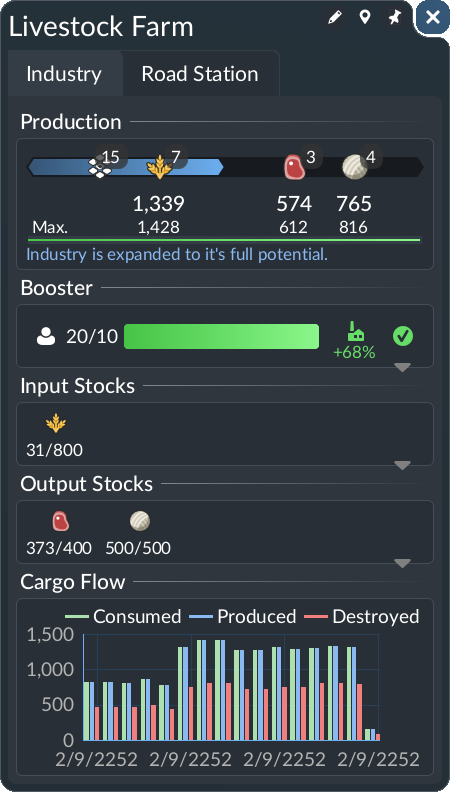
Open the panel shown above
Select the industry on the map, use its Industry tab, then find Booster below Production. Expand the worker entry to inspect the people associated with that boost. The Input Stocks and Output Stocks panels below it answer a different question: whether the factory has ingredients and finished goods.
Start with a single industry
Choose the site where the boost stopped. Leave the freight setup alone while you inspect its staffing. Note whether workers appear in the list, whether passenger vehicles arrive, and whether the boost returns after those arrivals. This gives you a specific problem to solve instead of expanding every route serving the industrial area.
For the passenger leg, follow one vehicle into the relevant stop and inspect the destination coverage. If nobody reaches the site, a larger freight train is an unrelated purchase. If workers do arrive but the effect later disappears, investigate the gaps between useful arrivals rather than judging the service only by one full bus.
Keep worker and material boosts separate
Raw industries can also use a specified booster cargo. That effect consumes stock and stops when its input runs short. Identify which boost disappeared before choosing a delivery: staffing and a missing material need different services.
A useful note has two rows: workers arriving, and booster cargo remaining. Keep both visible when comparing the industry before and after a route change. Do not substitute a generic list of tools, machines or fertiliser for the actual requirement shown at this particular site.
Build only the service the evidence calls for
If the staffing connection is not delivering, first make one existing service reach the site successfully. If it delivers in bursts, compare the interval between arrivals and the periods without a boost. Adjust that passenger service, then watch the industry's list again.
There is no verified universal bus count or interval for every industry in the cited manual. A suggested fleet of “five buses” would hide differences in route length, capacity and actual ridership. Use arrivals at this site as the check, not a fleet number copied from another map.
Check whether increased output can leave
Once staffing improves, inspect output and collection. A successful boost is useful only if the extra production serves your plan. If stock accumulates, investigate the pickup leg before building another passenger service. This is the point to use the separate cargo pickup checks.
Source: developer manual: Booster, checked October 19, 2026. The service comparison above is a diagnostic recommendation, not measured production gains.
See the official industry overview
Official industry footage, Future challenges chapter, 4:23. Published August 28, 2025, before release. Industry context only, not a demonstration of this fault or recovery. Current manual rules are cited above; footage stays on its original host.