Transport Fever 3 · Infrastructure
Noise barriers reduce road noise, but roadside buildings change the decision
On this page
Use Roads → Tools to inspect the Noise Barrier option, and check the roadside before applying it. The manual says buildings cannot stand along a road fitted with a noise barrier. Roadside trees are a different option: they reduce emissions while lowering the road’s maximum speed.
Published October 20, 2026 · Mouse and keyboard · Official manual checked October 20
Find the noisy corridor before adding a wall
Players reporting poor town noise ratings sometimes already run maintained vehicles and avoid residential delivery routes. Start with the source and location shown by your own noise view. A poor town rating does not tell you which single road needs rebuilding.
Inspect an actual affected stretch, its traffic and the buildings beside it. A barrier suited to an outer transport corridor may be a poor choice for the main street that gives shops and homes their access.
Compare trees and a barrier in the game view
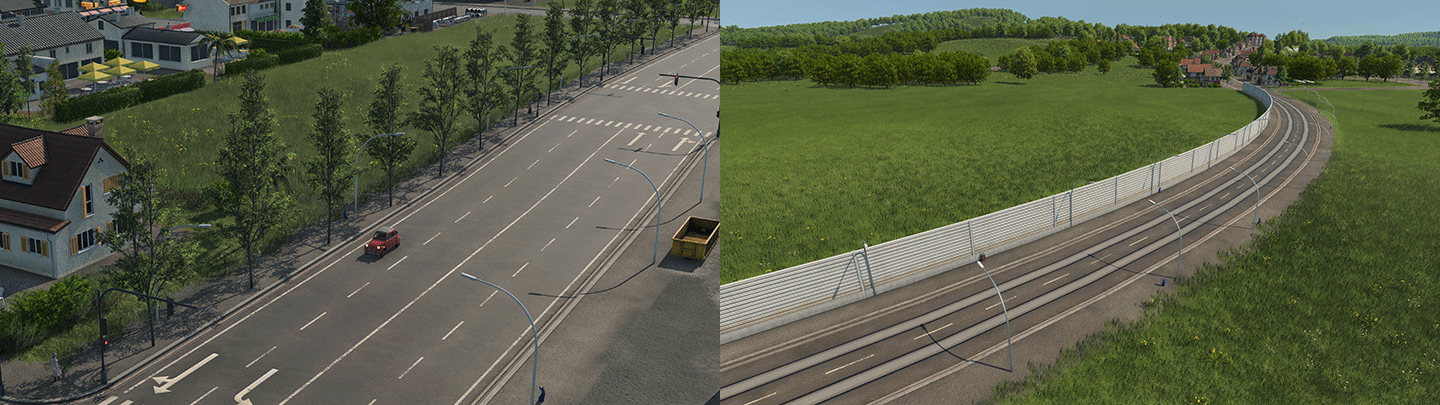
Open Roads, switch to Tools and select the intended treatment. Review the highlighted sections before applying it. Hold Shift when you need to limit the operation to a few sections, rather than the whole visible stretch between junctions.
- Record the current noise problem and the road sections you want to treat.
- Inspect the properties and access points along that edge.
- Preview the treatment and read any demolition or construction warning.
- Apply only where the resulting layout still serves the intended buildings and stations.
- Watch the corridor again before treating more roads.
Choose the trade-off for that street
For an open corridor outside the built-up area, a barrier can be easier to accommodate because fewer buildings depend on that edge. For a developed street, begin by examining whether its roadside use permits the treatment at all. Do not assume a wall preserves the same access pattern.
Trees have their own trade-off. If you apply an option that lowers road speed, check your bus and freight journeys afterward. A quieter road is not automatically a faster route, and putting more vehicles on a newly slower service can undermine the purpose of the change.
When the town rating stays poor
Check the location again rather than covering every street. Other traffic, rail infrastructure or facilities may still be part of the problem. Inspect vehicle condition where relevant; use the separate maintenance coverage guide if vehicles are deteriorating.
Keep noise, pollution and traffic flow as separate observations. The controls affect the corridor, while a town rating reflects a wider situation. This guide does not promise that one wall raises the town by a fixed rating tier.
Player context: noise and pollution question. Suggested “scrubber” fixes in that discussion are not included without a verified building and unlock path.
Source
Urban Games’ Streets and Tracks manual documents the controls and construction limits. The screenshot is an unchanged developer instructional excerpt, credited for explanation of the pictured feature. The comparison procedure is editorial guidance, not a measured gameplay result.