Transport Fever 3 · Community questions answered
Town growth broke your tram line? Protect the critical road
On this page
Repair the affected street’s tram connection first, then use Roads → Tools → player ownership on the vulnerable segment. Ownership prevents automatic town upgrades and adds road maintenance costs. It does not repair a line that is already broken.
Published October 20, 2026 · Mouse and keyboard · Sources checked October 19
Find what changed before rebuilding the whole line
A player described a cascade: town road changes broke a tram service, the tram stopped, and traffic backed up into another village. Treat that sequence as a reason to inspect the first immobilised tram, rather than widening the road at the back of the queue.
- Select the affected line and locate the first connection warning or stopped tram.
- Compare the street immediately ahead with a working section: road direction, tram rails, overhead wire where required and the next junction.
- Check the stop list too. A nearby stop on a newly changed road is not automatically the stop your line visits.
Keep a save before construction. Record the exact broken section so you can tell whether your repair changed that location or merely moved the queue.
Restore the missing tram segment
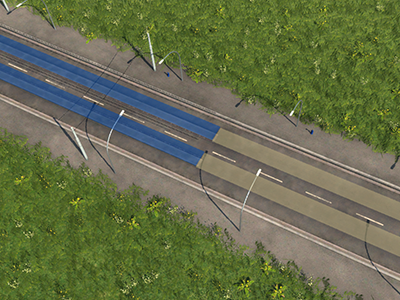
Use the road tools to restore the required tram infrastructure on the identified gap. Check the blue/yellow preview before applying it. For a small repair, hold Shift to limit the affected sections instead of modifying the whole visible corridor. Keep the original stops and vehicles while checking the result.
For example, if rails exist on both approaches but the changed junction segment lacks them, repair that gap before replacing the vehicle. Afterward, watch the same tram cross the junction and reach its next scheduled stop. A disappearing warning is useful; an actual completed movement is the stronger check.
Claim the sections that must keep their layout
Open Roads, switch to Tools and select the player-ownership control. The community describes its padlock icon. Apply ownership to the critical road sections and inspect the selected extent. Roads you constructed are not necessarily already player-owned.
Claim the essential tram corridor selectively. Protecting every street creates a wider maintenance commitment without identifying the original fault. Record the road cost before and after and keep a note of why you claimed each important segment.
If the tram still will not move
- Connection warning remains: trace the next segment and stop; ownership is protection, not a connection fix.
- Route is valid but traffic blocks it: inspect the junction’s permitted lane movements.
- Only the replacement vehicle fails: compare its track and power requirements with the working vehicle.
The practical stopping point is a working service on a protected critical segment. Do not assume ownership guarantees that every neighbouring road, building or private vehicle will behave differently.
Sources and version scope
Urban Games’ official manual supplies the documented controls. Original player discussion supplies the question and community observations. The documented ownership effect is prevention of automatic upgrades. Broader claims that it freezes all city expansion are not established here. The diagnostic sequence is independently written; no personal gameplay test or guaranteed performance improvement is claimed. Screenshots are the developer’s instructional examples, not the forum author’s save.