Transport Fever 3 · Warehouse transfers · Freight hubs
A warehouse full of cargo still needs an outbound delivery
On this page
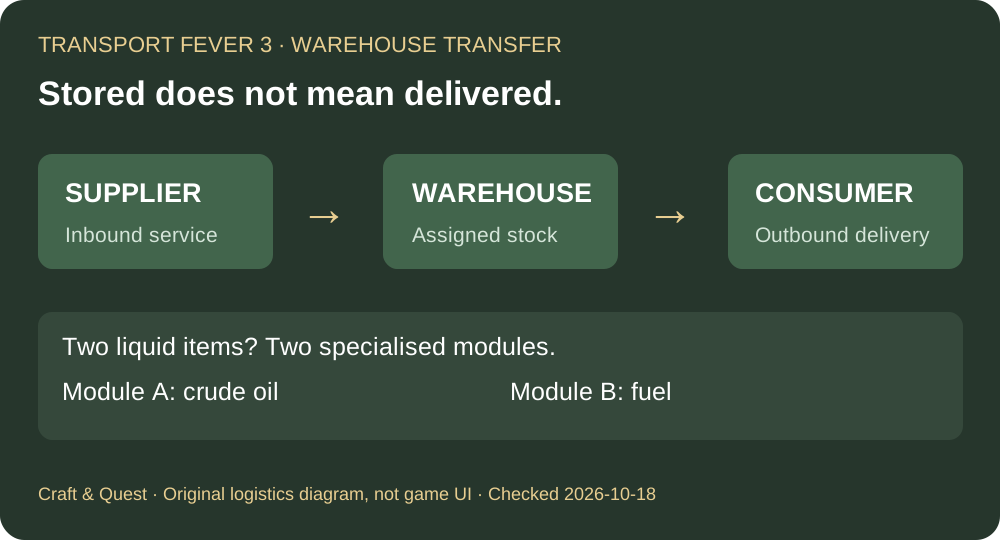
Factories and town buildings cannot take cargo directly from a warehouse. You must transport it onwards. Check the outbound line and its pickup configuration before expanding storage. For specialised storage, reserve a separate module for each cargo item—even when both items share a category.
Published October 18, 2026 · Official manual checked October 18 · Vanilla warehouse mechanics
See the developer's warehouse overview
Official Transport Fever channel, Logistics and warehousing, 2:43. Published August 28, 2025: pre-release demonstration. The current manual supplies the rules below. Video remains on the original host; this is not our gameplay footage.
Build the two legs as separate jobs
Write down the complete journey before adding another building:
- Inbound: the source, cargo item and service bringing it to the hub.
- Storage: the warehouse module intended to hold that item.
- Outbound: the service collecting it and the actual consumer receiving it.
Use this as a test plan. If the inbound service works and stock rises, that observation only confirms the first part of the journey. Watch an outbound vehicle at the hub next. If its load does not rise, inspect that service's pickup stop rather than changing the already-working inbound leg.
The line manager exposes cargo selection and loading percentages per stop. Confirm the hub's pickup row is enabled for the intended item. Avoid editing a similarly named destination stop by mistake. Then observe one complete delivery to the consumer before increasing traffic.
Check catchment, not just the road beside the warehouse
The warehouse manual says road access is not required for the warehouse itself; vehicle transfers depend on being within a station's catchment. The station manual shows coverage when placing or selecting a station. Cargo-accessible locations are highlighted blue, or white when both cargo and passengers are supported.
Apply that check separately at the hub and at the receiving end. A road passing close by is not your test result. Select the station and inspect the intended location's coverage, then check whether the vehicle actually collects and delivers the item. Road vehicles still need a usable route to their stops; warehouse access rules do not make a disconnected truck line work.
One liquid category does not mean one shared module
Specialised warehouse modules hold one cargo type at a time. The manual explicitly uses crude oil and fuel as the example: storing both needs two modules, despite both being Liquid. In the warehouse window, expand Stocks and use a specialised module's cargo icons to choose its item.
For a hub handling both products, make a two-row plan before construction:
- Module A: crude oil, its incoming service and its outgoing service.
- Module B: fuel, its incoming service and its outgoing service.
This prevents an easy planning error: reserving capacity for a category while forgetting that two different inventories need separate assignments. Check the actual Stocks rows after a delivery; don't assume that an unfilled module is already assigned to the item you intended.
When specialisation helps—and what it cannot repair
Universal storage is flexible. Specialised modules offer faster handling and freeze the stored item's delivery timer. These benefits do not create the missing outbound service or make an incompatible vehicle load the item.
Choose specialisation after the chain works. For example, a proposed oil-and-fuel hub may justify dedicated modules because both flows are intentional. For a small test route, first prove a transfer with the storage and vehicles you actually have. Compare the same journey before and after an upgrade; do not count a larger storage limit as proof of faster delivery.
Keep these observations separate
- Stock rises, nothing leaves: investigate the outbound service and pickup item.
- The wrong item occupies a specialised module: inspect that module's assignment and the intended flows before changing it.
- Vehicles collect but the consumer remains unsupplied: inspect the destination, coverage and item needed there.
Record each leg's cargo and observed load. This turns “the warehouse does not work” into a specific transfer you can inspect.
Sources and related guides
Official references checked October 18, 2026: warehouse access, Stocks and specialisation, station catchment display and per-stop cargo configuration. The two-leg checklist and example hub plan are independently organised recommendations, not measured throughput results.
For an empty pickup vehicle, follow the cargo loading checks. Transport Fever 3 guide hub →