Warframe · Modding · Capacity
Why your Warframe Mod build will not fit—and what to change first
On this page
Compare total equipped drain with the capacity shown in Upgrade, not the number of empty slots. Check Mod ranks and slot polarities before removing a useful Mod. A Reactor expands Warframe capacity; a Catalyst is the weapon upgrade.
Published October 17, 2026 · Standard Mod export and official Mods Guide reviewed
Start with a budget, not eight filled slots
Open the equipment’s Upgrade screen and note its displayed capacity. Then inspect the drain of each equipped Mod in its actual slot. Rank, variant and polarity can make a copied build cost more than the one shown in somebody else’s image.
Separate two decisions: which effects the build needs, and which ranks currently fit. In our Rhino starter plan, ability strength, duration and efficiency form the core. A capacity shortfall is a reason to plan their ranks and placement; it is not automatically a reason to abandon that role or buy an upgrade.
- 1Read displayed capacity and actual drain
- 2Check ranks, variants and matching slots
- 3Choose a fitting configuration before spending resources
Worked example: three standard Mods
These inputs are maximum-rank standard variants from the official export, before any slot adjustment. They are not a claim that every beginner owns these ranks.
| Mod | Unadjusted drain |
|---|---|
| Intensify | 11 |
| Continuity | 7 |
| Streamline | 9 |
| Total | 27 |
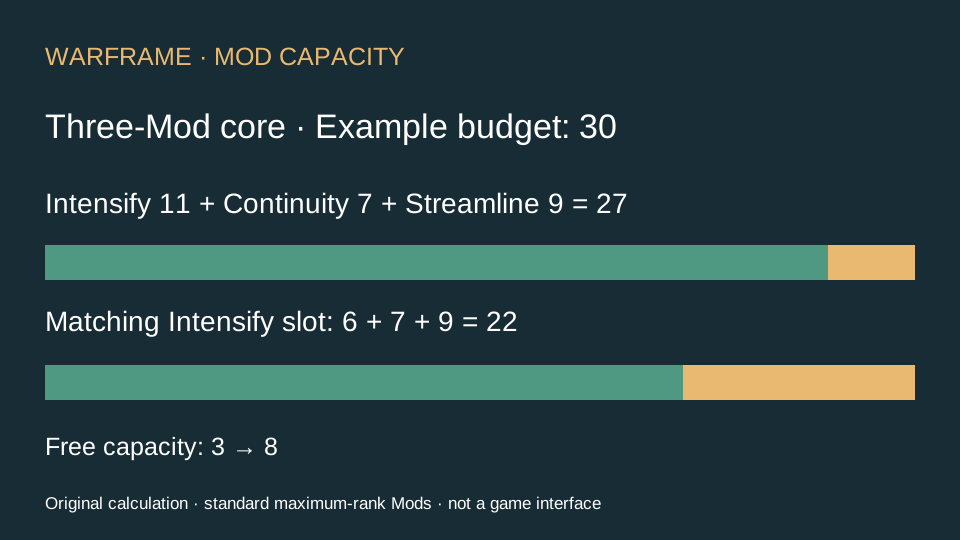
For an illustrative displayed capacity of 30, this core leaves 3. An additional 9-drain Mod would exceed that budget by 6. The empty slot is available, but the capacity is not. These are arithmetic examples using a chosen capacity, not a prescribed equipment rank or a promise about your account.
How one matching slot changes the answer
A matching regular-slot polarity halves drain, rounded up. For the 11-drain Intensify in this example, the adjusted drain is 6. The core then costs 22, leaving 8 of our illustrative 30 capacity. An 8-drain addition now fits exactly; a 9-drain addition still exceeds this budget by 1.
This does not assume Rhino already has a matching free slot. Inspect the actual configuration. If the matching slot is occupied by another Mod, moving that Mod may change its cost too. Recalculate the whole loadout after the move rather than counting only the saving on Intensify.
Choose the remedy that matches the cause
| What you see | Check first | Decision |
|---|---|---|
| The build stopped fitting after Fusion | The upgraded Mod’s higher drain | Use a fitting configuration or another copy at a suitable rank; plan future Fusion against the entire loadout. |
| Your ranks match a build image, but its cost is lower | Slot symbols and exact Mod variants | Compare effective drain slot by slot. A displayed name alone is not enough. |
| You have an unlocked Exilus slot but no spare capacity | The total budget | An extra slot does not make its Mod free. |
| You intend to expand Rhino’s capacity | Reactor versus Catalyst | Choose the Warframe upgrade, not the weapon item; inspect the confirmation before committing. |
Aura and Forma need their own checks
Aura Mods add capacity rather than using it. Their polarity rules differ from ordinary slots, so do not apply the regular-slot halving example to the Aura bonus. Use the final capacity displayed after the Aura is equipped.
Forma changes slot polarity; it is not a direct damage increase. Settle the intended loadout before choosing a permanent slot plan. A polarity that helps today’s high-drain Mod can be less useful when a different configuration needs that slot. Try the affordable layout first, then make a deliberate resource decision.
Sources and next step
Capacity, polarity, Fusion, Aura, Exilus, Reactor and Catalyst rules: Digital Extremes’ Mods Guide. Mod inputs: official public Mod export, reviewed October 17, 2026. Calculations and decision examples are original editorial work; special Mod families can have their own restrictions.
Once the layout fits, return to the Rhino ability and Mod progression plan to choose an energy or range branch. All Warframe guides →