ARC Raiders · progression · Frozen Trail / 2.1 review
ARC Raiders Acquire Resources: Finish a Craft Without Recycling the Wrong Item
On this page
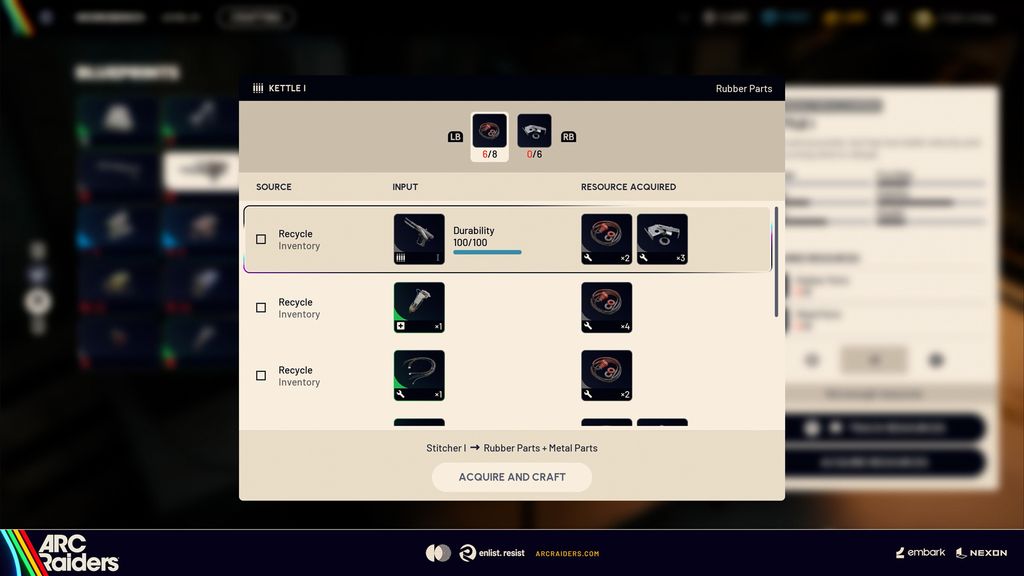
Open the intended craft and use Acquire Resources when materials are missing. It lists sources currently available to your character, including recycling and Celeste offers where applicable. Inspect the item or currency being spent before confirming; the button is not a promise that every missing material can always be obtained.
Published October 18, 2026 · Official sources checked against the October 13 update
The useful change is fewer menu trips, not free materials. Make the final item your starting point and work backward through the proposed sources. A quick craft can still consume something you meant to keep for a project, another loadout or a later repair.
What to do, in order
- Select the exact item and quantity you intend to craft. Avoid starting the material search from an unrelated inventory item.
- Open Acquire Resources from the crafting screen and inspect the sources actually offered. Missing options and insufficient amounts are different problems.
- Compare the proposed recycling inputs with anything you have reserved for another purpose. Compare a trader source with the currency and purchase you would give up.
- Choose only the acceptable sources, review the resulting material coverage, and confirm the intended acquisition or craft action. Check the resulting inventory before beginning another batch.
Choose the check that matches the problem
| Situation | What it means | Useful next decision |
|---|---|---|
| An available recycle source | It converts an existing possession into a needed material. | Check that possession against your next project before spending it. |
| An available trader source | It solves the material gap through a purchase. | Compare the cost with the next purchase your loadout needs. |
| No offered source for one ingredient | The feature only exposes currently available routes. | Treat the remaining gap as a separate acquisition task. |
Compare the whole transaction, not just the green recipe
A recipe becoming craftable tells you that the selected sources can cover its requirements. It does not tell you that those sources were the best use of your stash. Think of the operation as an exchange: an existing item or some purchasing power becomes an ingredient, and the ingredient becomes the finished object. Your decision should account for all three stages.
A practical way to apply the rule
Suppose the displayed recipe needs three units of a material. One acceptable recycle input provides two, while a proposed trade covers the remaining one. That arithmetic can close the gap, but it does not justify recycling a reserved item just because it appears first. These are illustrative amounts: use the yields and prices shown in your own recipe panel.
Common misreadings and failure checks
Acquire Resources does not find everything
Check whether the remaining material has a currently available source. The developer explicitly limits the list to available options.
An old video shows a different trader source
Offers and available routes can differ. The 2.0 notes also fix unintended Nomadic Trader offers appearing in this menu.
The finished item was not worth the materials
Keep the next loadout or project in the comparison before accepting the shortcut again.
Sources and version
The rules above come from the linked developer publications. The check order, comparisons and planning examples are independent editorial guidance. Images are unchanged publisher media, not captures of a personal playtest; no drop rate, hidden formula or measured build performance is claimed.