Factorio · Train dispatch · Priority versus capacity
Train stop priority: check the limit before changing the number
On this page
Priority chooses between eligible same-name stops; it does not make a disabled or full stop eligible. Open the desired stop, check its train limit and reservations, then adjust Priority. An already dispatched train does not change destination merely because you increased another stop’s priority.
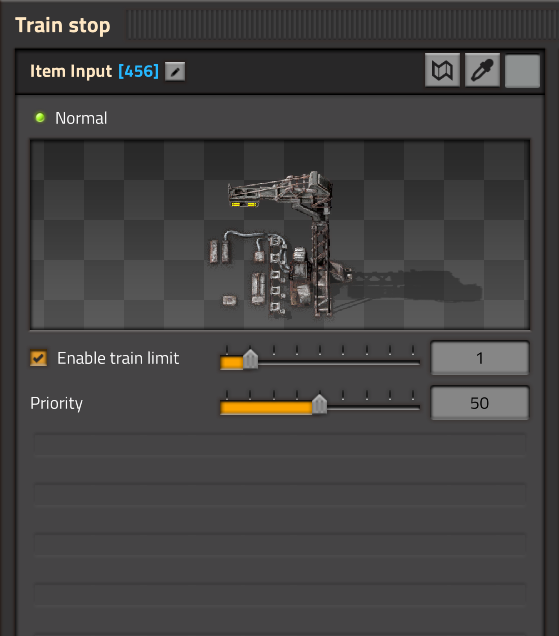
The two controls have different jobs
Train limit controls how many trains may reserve the stop. Priority ranks eligible stops sharing the destination name. The ordinary scale is 0 to 255, with 50 as the default; higher values take preference.
Do not increase the train limit unless the stop and its waiting tracks can accommodate the extra train. More reservations do not create more rail space.
A dispatch example
Imagine two stops named Iron Pickup. Mine A has Priority 100 and limit 1. Mine B has Priority 50 and limit 1. The numbers below are illustrative settings, not recommended settings for every factory.
| State when a new train is dispatched | What to expect |
|---|---|
| Both stops are reachable, enabled and have capacity | A takes preference because its priority is higher. |
| A already has its one reservation; B remains available | A’s higher priority does not bypass its limit. B can receive the train. |
| Both priorities are equal and both stops are valid | Pathfinding cost becomes relevant; do not assume geometric distance alone determines the choice. |
| A’s priority rises after a train was dispatched to B | That priority change alone does not redirect the train already travelling to B. |
A practical order for correcting dispatch
- Confirm both candidate stops really share the scheduled name.
- Check whether circuit control is disabling one stop or setting its limit to zero.
- Count reservations, including approaching trains, before calling a platform available.
- Set the preferred stop’s priority and observe a new dispatch.
- If equal-priority results look surprising, inspect path and congestion rather than adding arbitrary priority changes.
For an outpost that is running out of resources, a priority signal can express preference, while a limit expresses whether a train can be accepted. Treat those as separate decisions. Priority cannot load ore into an empty train, open a disconnected branch or compensate for an unloading station with no capacity.
Related railway checks
Limits and route troubleshooting · Matching generic destinations · All Factorio guides
Sources and version
Published October 18, 2026. Source-based explanation of PC 2.0-era railway controls, checked against the official references on this date. Current stop eligibility and priority reference · Developer priority explanation · Pathfinding cost reference. Examples below the pictured settings are our diagnostic recommendations, not measured throughput results. Images are used under Wube’s website-asset guidance. Official game and demo.