Mycopunk · 1.0
Mycopunk ERROR_REDACTED: Make the Hidden Mission Appear
On this page
In 1.0, //ERROR_REDACTED// always appears in mission select once the Gunship Cannon reaches level 5, provided the associated secret remains undiscovered.
Check the Gunship Cannon’s own level
The 1.0 update makes //ERROR_REDACTED// appear in mission select when your Gunship Cannon has reached level 5 and you have not found the associated secret. Start in Gear and read the level on the Gunship Cannon’s entry. The separate player-level display in the middle of the screen can otherwise make this requirement easy to misread.
In the example below, the player is level 4 and the Gunship Cannon is level 3. The weapon still needs to reach level 5 for this appearance condition. Use the weapon entry as your checkpoint when returning from missions.
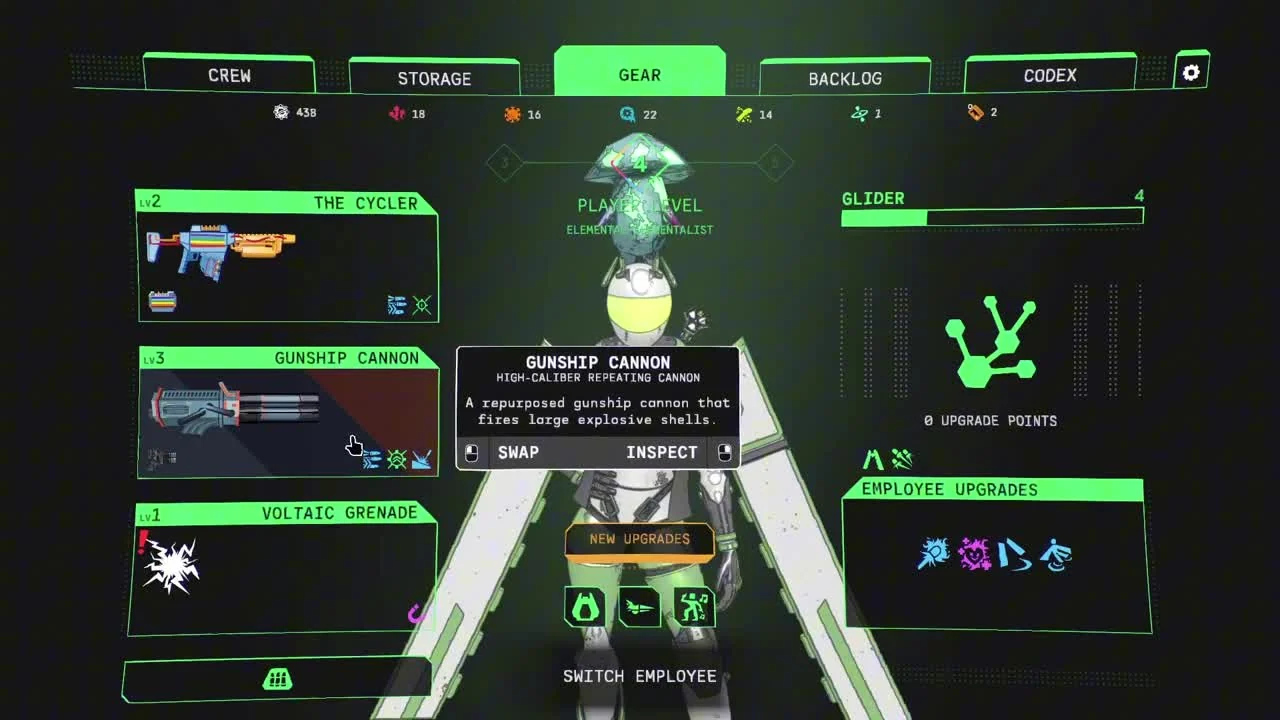
Return to mission select after reaching level 5
- Inspect Gear and confirm the Gunship Cannon is at least level 5.
- Return to the mission selection terminal in the HUB.
- Look for the mission named //ERROR_REDACTED//.
- Select its card and read the mission’s own conditions before launching.
The launch notes say the mission will always appear while those conditions apply. That gives returning players a concrete check before spending more time cycling through ordinary missions. Recheck the weapon level first if the expected mission is absent.
If you are still building the cannon’s loadout, keep the upgrade arrangement you can use reliably while leveling it. Patch 2.0.3 also corrected how the cannon’s Prism upgrade benefits from a larger infused pattern. Check the infusion comparison steps if you are following an older Prism example.
Why an older save may show something different
The appearance rule also checks whether you have already found the associated secret. On a returning save, confirm what you have already discovered before expecting the mission to remain available under this rule. The condition is most useful when you have the leveled weapon and are still seeking that discovery.
| Check | What to inspect |
|---|---|
| Weapon requirement | Gunship Cannon level 5 or above |
| Save progression | Associated secret still undiscovered |
| Game version | 1.0 or a later installed patch |
| Mission name | //ERROR_REDACTED// in mission select |
Finish checking those conditions on the save you intend to play. Switching between saves while investigating can mix together different weapon levels and discoveries. Keep a screenshot of the Gear entry alongside the mission list if the result remains inconsistent.
Separate the appearance check from the mission itself
Once its card appears, the visibility check is complete. Read the card and prepare for the assignment before launching. This page covers getting the hidden mission into the selection list; the discovery inside it has its own progression.
The 1.0 notes also fixed //ERROR_REDACTED// spawning too low in the ground. If you are revisiting an old attempt, update the game before investigating an inaccessible objective again. For a current problem, record the visible marker and surrounding terrain along with your installed version.
Before leaving an assignment, follow the extraction instruction through boarding. Under the 1.0 Drop Pod rule, a mission fails when nobody successfully gets inside. Checking the hidden mission’s availability should end with a prepared launch, rather than rushing into a run and losing its result at extraction.
Sources
Pigeons at Play: 1.0 release notes · Patch 2.0.2 · Patch 2.0.3.