Transport Fever 3 · Station queues
An empty platform is not automatically an alternative stop
On this page
Enable the spare terminal for that line's stop and confirm it is reachable. The extra platform is useful only if an approaching vehicle can choose it when the primary terminal is occupied.
Published October 19, 2026 · Mouse and keyboard · Current developer manual
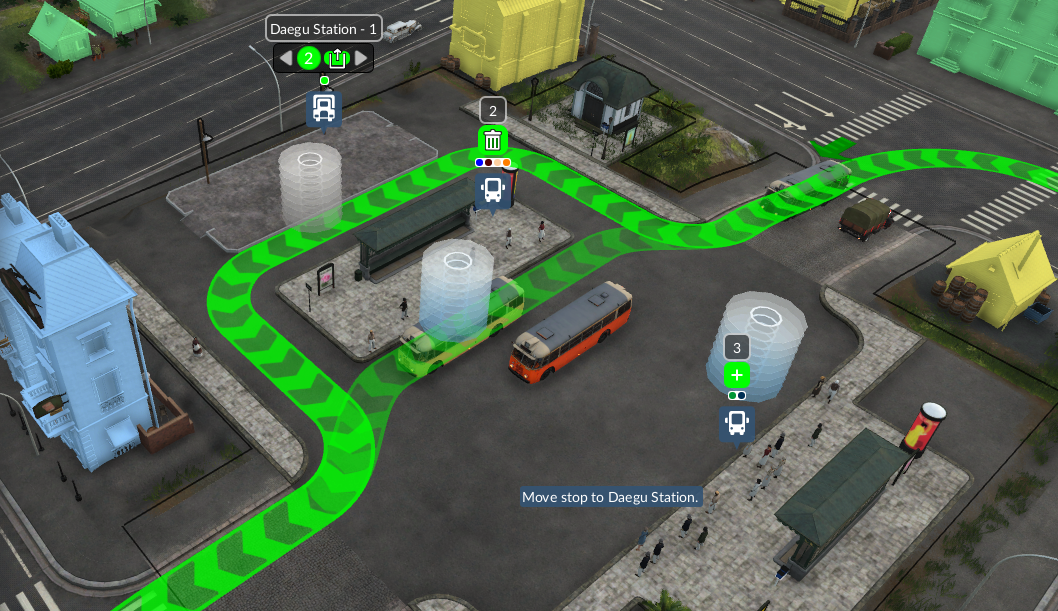
Find the stop you are actually changing
Open the line manager, select the service and find this station in its lower stop list. Check the stop name before changing platforms: a service visiting the same station twice can have two different entries.
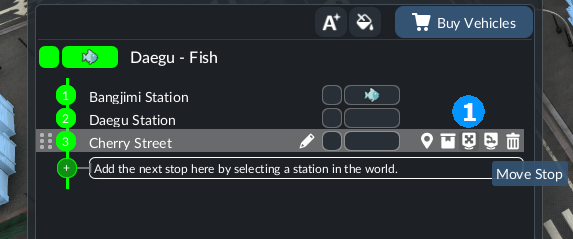
To change the main terminal, use Move Stop and choose the intended location. To keep the primary and add backups, use the alternative-terminal control; while moving a stop, the world view also offers + above terminals that can be added. Replacing the primary and enabling alternatives solve different tasks.
Check the approach before buying another vehicle
For road vehicles, the choice is made at the station entrance. Trains make it at the last signal before the station; open the line window or manager to identify that signal by its blinking line-coloured arrow. Every enabled rail alternative must be reachable from there.
A track connected elsewhere in the station is not enough. Trace the approach to the intended platform and its departure towards the next stop. If the game flags a connection, read it before expanding the selection.
What to watch during the next queue
- Keep the existing primary terminal and add one intended alternative.
- Confirm the selection belongs to the correct stop entry.
- Watch a vehicle approaching while the primary is occupied.
- Record whether it takes the alternative, waits outside or reports an unreachable segment.
If an enabled alternative is unused, investigate its access from the decision point. If both terminals are occupied, another alternative cannot create space on the shared approach or exit. Inspect where the queue begins rather than adding platforms to the far end of it.
For ships, selection happens at the waiting point outside the harbour; for aircraft, at the runway's end. Do not copy the road-station layout in the screenshot as a railway signal plan.
Keep platform access separate from handling
A vehicle reaching a free platform may still load slowly or wait for cargo. After proving the route works, inspect platform length and loading modifiers or the departure rule. Changing all three at once makes it difficult to see what fixed the original queue.
Source checked October 19, 2026: developer manual sections Alternative Terminals and Connection Problems. Screenshots show their documented controls; the inspection order is an editorial troubleshooting method, not a measured throughput test. All guides →