Transport Fever 3 · Station handling
Slow loading? Find the handling penalty before buying a faster train
On this page
Inspect the loading-speed breakdown and short-platform warning first. A faster locomotive cannot remove a penalty at the loading platform. Check the vehicle, terminal and storage handling as one system.
Published October 19, 2026 · Vanilla mechanics · Mouse and keyboard
Locate the delay during one visit
Follow one vehicle from arrival until departure. Record when cargo actually starts moving, whether its count continues increasing, and whether it remains after loading stops. A queue outside the station, slow transfer inside it, and waiting for more stock are three different observations.
Choose a visit with stock available. If the vehicle receives nothing, begin with pickup configuration; a loading-speed upgrade cannot demonstrate that a disabled pickup is fixed.
Read the penalty before extending anything
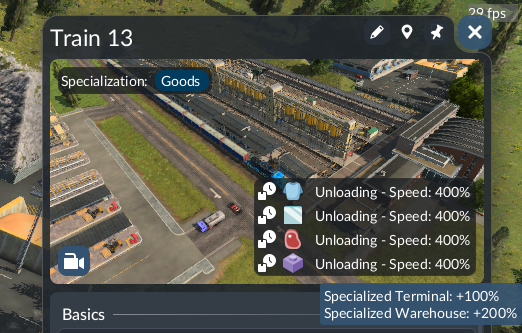
The vehicle's cargo-loading status exposes a speed percentage and modifier breakdown. A train or tram longer than its platform receives slower handling and a warning. Record the vehicle length and the terminal it actually uses, not another longer platform in the same station.
For a proposed extension, keep a note of the original length, warning and observed transfer. Change only the relevant platform, then repeat with the same consist and cargo. This comparison answers whether the identified mismatch was removed. It does not promise that the whole line's profit or capacity doubles.
Follow the cargo through the handling chain
Matching cargo specialisations can improve transfer, while mismatches impose penalties. Inspect all applicable parts: the vehicle, the terminal and a warehouse when used. Specialised terminals may handle other freight much more slowly; do not apply a bulk-focused upgrade to a mixed service without checking its other loads.
Make a small inventory of the service before spending:
- Which items are loaded on the outward leg?
- Which are loaded on the return leg?
- Which terminal does each visit use?
- Which component shows the adverse modifier?
If a modification benefits one product while worsening the other, compare that whole service. The useful outcome is less time handling the intended freight, not merely acquiring a building labelled specialised.
Official demonstration: handling efficiency from 3:28
Official Transport Fever video, 3:28, published August 28, 2025. Pre-release conceptual demonstration; current manual supplies the instructions. Original hosted video, not our footage.
Verify the result without hiding a new bottleneck
After a change, inspect the warning and modifier again and watch another visit. If transfer improves but the queue remains, investigate arrivals and terminal availability next. Adding vehicles during this test changes the traffic too, so postpone fleet expansion until the station result is clear.
A universal terminal can be a sensible starting point for a small mixed route. Keep it if its flexibility solves your current task; specialise when an observed handling problem justifies the cost.
Sources and next task
References checked October 19, 2026: current loading controls, station handling and the developer's cargo-system explanation. Examples below are diagnostic plans, not measured gameplay results. Chinese supply-chain guides informed the problem selection; their text and images are not reproduced.
If cargo finishes moving but the vehicle stays, inspect the departure mode. All guides →