Transport Fever 3 · Departure rules
Why does a loaded vehicle keep waiting? Check its departure rule
On this page
Full load (any) waits for one cargo type to fill; Full load (all) waits for the vehicle to fill. In the vanilla game that distinction matters for trains and ships with multiple cargo spaces. Other vehicle types wait for a full load under either option.
Published October 19, 2026 · Vanilla rules, not modded vehicle behaviour
Identify waiting rather than slow loading
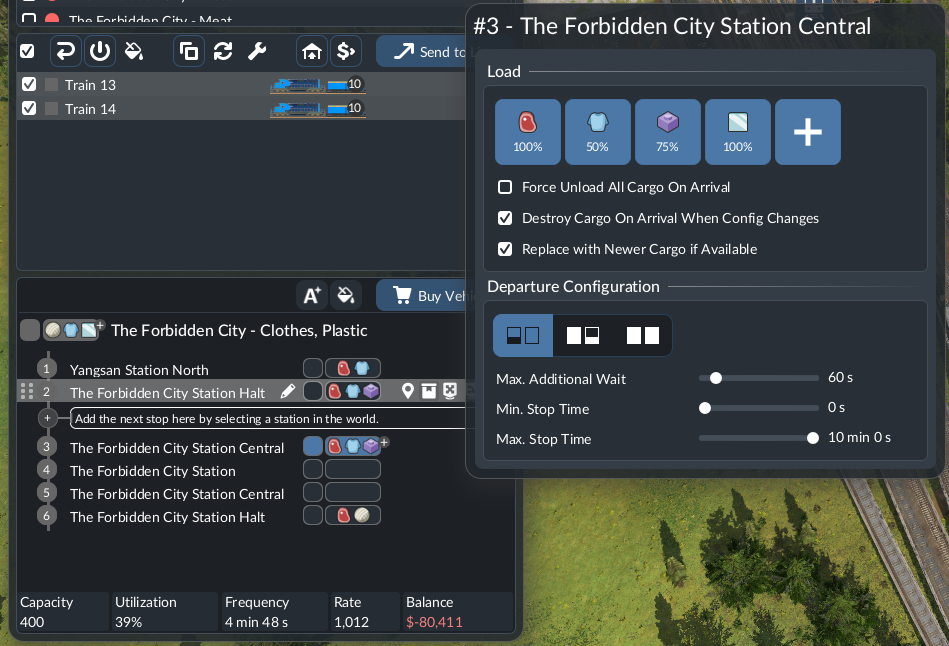
Watch the load counter. If it continues rising slowly, investigate handling speed. If it stops rising while the vehicle remains at the stop, read the departure configuration before replacing the engine or building another station.
Open the line manager and select the affected stop. Open its cargo configuration using the configure-stop button or cargo icons in the stop row. In the panel shown above, find Departure Configuration beneath the cargo selections. Record the mode, selected cargo items, loading percentages and any extra waiting time. Check the actual stop row: the return pickup can have a different purpose from the outward pickup.
Choose a rule that matches the job
- Load if available: collect compatible available cargo rather than deliberately waiting for a full load. Useful for testing whether the service can complete a circuit.
- Full load (any): useful when a mixed train or ship may leave once one cargo type fills, rather than waiting on every product.
- Full load (all): choose when filling the entire vehicle is intentional and supply can support that plan.
These modes express a departure objective. They do not create stock, enable a disabled cargo filter or guarantee a profitable trip.
A mixed-load example
Suppose your plan carries products A and B. A arrives regularly; B is intermittent. Under a whole-vehicle filling objective, abundant A does not necessarily resolve the missing B capacity. Before increasing the number of vehicles, decide whether waiting for B serves the consumer better than a repeatable circuit.
Keep this example separate from actual capacity allocation: the compatible spaces and percentages depend on your vehicle and selected settings. Read those values in your own configuration rather than copying an invented 50/50 split.
Test a complete circuit
- Preserve the original stop settings in a note or screenshot.
- Use Load if available temporarily on the troublesome pickup.
- Watch one arrival, pickup, departure and delivery.
- If the circuit works, choose a filling rule deliberately and check it again.
If the vehicle still does not depart, inspect its displayed state and route warning. If it leaves empty, return to stock, compatibility and cargo-selection checks. Avoid changing every stop at once: that loses the comparison with the original failure.
Sources
References checked October 19, 2026: current loading controls, station handling and the developer's cargo-system explanation. Examples below are diagnostic plans, not measured gameplay results. Chinese supply-chain guides informed the problem selection; their text and images are not reproduced.