Transport Fever 3 · Station and vehicle controls
Extend the existing station through Configure
On this page
Select the station and choose Configure. Add modules at the available placement markers. If you need to remove one part, use the removal tool inside configuration mode; using the bulldozer outside it targets the whole station.
Published October 20, 2026 · Mouse and keyboard · Manual checked October 20
Enter the station’s construction mode
Keep a save before changing a station that already carries traffic. Select the station itself and open Configure. The map changes to the pale modular-construction view, with the module choices along the bottom.
If you still see the ordinary map and a general bulldozer cursor, stop before clicking the station. You have not established that you are editing an individual module.
Use the blue markers to check where the addition fits
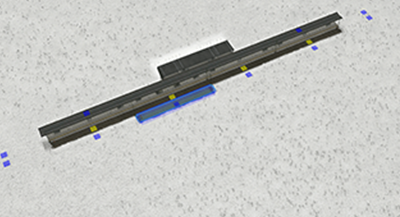
- Select the module category needed for the job: track, platform, building or access connection.
- Move the proposed module to an eligible marker and inspect its footprint.
- Read the displayed construction cost and any conflict warning.
- Place the module, finish configuration and reopen station details.
Modules have placement rules. A roof or underpass belongs over or under another module, while a track addition follows the station’s alignment. Trying the right part in the wrong category or position can look like a collision that extra terrain space will not solve.
Remove only the part you intended
When replacement is necessary, keep the removal action within Configure and inspect the highlighted target. For a busy platform, first note which services use it. Do not remove several working tracks to discover whether a single entrance was the conflict.
For example, if your aim is a longer platform, try the extension positions before replacing the whole station. If you are changing access, keep the platform and its vehicle assignment stable while checking that new path.
Check services after finishing
Reopen the affected line and inspect its assigned terminal. Watch one arrival and departure. A construction that fits physically may still leave the service using its previous platform or without a reachable route.
- Platform exists but line avoids it: inspect the terminal assignment and approach.
- Waiting crowd remains: inspect capacity and departures.
- Passengers cannot reach it: inspect the access path separately.
Keep the original station until the desired addition and its service have passed that check. Demolition is a much larger change than module editing.
Source and screenshot scope
Urban Games’ official manual documents the controls and compatibility rules. The test sequence is independently organised. Images are unchanged publisher instructional excerpts used to explain their visible controls or layout; they are not our gameplay tests and no blanket open licence is claimed.