Transport Fever 3 · Station and vehicle controls
Overcrowded station: add waiting space or fix the service?
On this page
Open the station details and read Waiting Hall alongside the individual passenger terminals. Longer platforms and suitable side buildings can add waiting capacity. They do not make a late or undersized service collect passengers faster.
Published October 20, 2026 · Mouse and keyboard · Manual checked October 20
Read the station window before buying a train
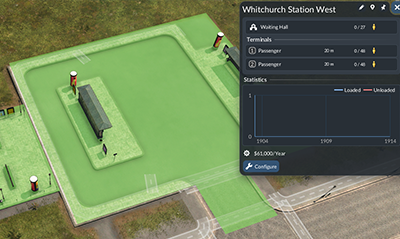
Select the crowded station and note its waiting count before the next departure. Watch the relevant terminal when a vehicle arrives. Does the queue shrink substantially, or does almost everyone remain behind? That observation tells you whether extra space alone addresses the problem.
If the station is briefly full between otherwise effective services, additional waiting space may suit it. If every departure leaves a growing queue, make the service work before treating a larger building as the solution.
Add usable passenger space
- Save the layout and open the station’s Configure view.
- Inspect available passenger platforms and side buildings. Read each building’s capacity description.
- Choose a module that adds the capacity you need and fits the station.
- Review cost and placement, then finish configuration.
- Reopen the station window and check that the relevant capacity increased.
Keep platform length and the actual vehicle in mind. Extending a platform for a longer consist is a different job from adding shared waiting capacity. Use the module description rather than judging capacity by the roof’s size.
Check one departure cycle
Record the waiting count before arrival, how many board and what remains afterward. Repeat over comparable departures. A single nearly empty train can be misleading if it has just entered service and not yet reached the busy stop.
If the queue keeps growing, inspect frequency, available seats and the destination passengers need. A higher station limit buys room to wait; it does not create a suitable onward journey. See Frequency versus Rate when deciding whether another vehicle addresses that gap.
Avoid changing access and capacity together
Adding a new entrance can change which passengers reach the station. If you add that entrance, extend platforms and double the train fleet in the same pause, it is hard to tell what fixed—or enlarged—the queue.
Keep the first change small and inspect its result. If nobody can reach the station despite plenty of room, use the separate passenger walking-path check. An access failure and an overcrowded platform need different repairs.
Source and screenshot scope
Urban Games’ official manual documents the controls and compatibility rules. The test sequence is independently organised. Images are unchanged publisher instructional excerpts used to explain their visible controls or layout; they are not our gameplay tests and no blanket open licence is claimed.