Transport Fever 3 · Practical network management
Frequency and Rate answer different questions about your line
On this page
Frequency is the real-time interval between vehicles at normal game speed; Rate is the average yearly cargo or passengers transported per station. A lower time value and a higher throughput value are not interchangeable evidence of a healthy service.
Published October 19, 2026 · Vanilla PC controls · Sources checked October 19
Read one row all the way across
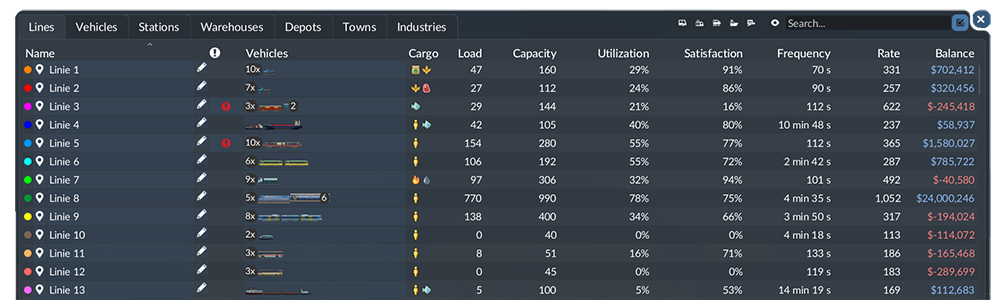
Open the Lines statistics from the statistics controls in the lower-right corner. Find the affected service by name. Keep its row selected while comparing Frequency, Rate, Load, Capacity, Utilization, Satisfaction and Balance.
The Cargo column describes what is currently being carried, not the stop's configured pickup filter. If it is empty, open the line's configuration before concluding that the service was never set up for freight.
Pick the symptom before choosing an upgrade
- Long gaps with a queue of passengers or freight: investigate whether arrivals are frequent enough and whether vehicles are bunching or delayed.
- Regular arrivals with mostly empty vehicles: inspect the demand and pickup journey before multiplying capacity.
- High loads but disappointing yearly transport: follow the trip for long waits, slow handling or traffic.
- Transport improves but the line still loses money: compare its operating balance rather than treating throughput as profit.
These are starting points, not automatic diagnoses. Follow one vehicle and connect the table's symptom to something observable on its route.
Keep a before-and-after row
Record the same service's figures before an adjustment. Note the vehicle count and the change you make. After observing the modified service, compare that same row again; do not compare two unrelated lines with different journeys as if they were a controlled test.
For example, if more vehicles reduce the interval but utilisation falls and a station queue grows, the extra capacity has not proved that the bottleneck disappeared. Inspect the queue. If a loading change improves the circuit without changing the fleet, record that separately from the fleet's total capacity.
Avoid mixing the units
A frequency in seconds cannot be compared directly with an annual cargo demand. Nor is total capacity the same as cargo actually delivered. Keep the units beside each number in your notes. This page does not convert real minutes into game years or promise an exact fleet count from a single table snapshot.
For a vehicle waiting too long, check departure rules; for an empty vehicle, check pickup configuration.
Sources
Line Statistics definitions, official manual. The inspection sequence and examples are editorial recommendations; no gameplay performance test or guaranteed gain is claimed.