Transport Fever 3 · Station and vehicle controls
Large ship rejected by a harbor? Inspect the landing, not the building
On this page
Large ships require a large landing area. Select the harbor and inspect the terminal assigned to the line. Extending the visible pier with more small facilities does not establish that the assigned landing supports the ship.
Published October 20, 2026 · Mouse and keyboard · Manual checked October 20
Identify the three parts of the harbor
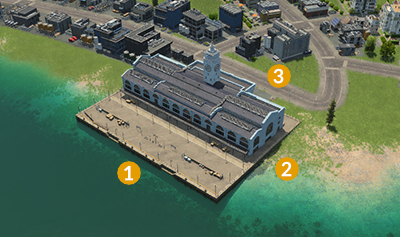
Start with the affected ship and its next stop. Write down which harbor and terminal it is trying to reach. A map can contain several nearby landing areas; checking a different large berth does not validate the one in the line.
Inspect size and approach separately
- Open the harbor and enter Configure.
- Find its landing areas, identified by yellow anchors in the construction view.
- Check whether the intended berth is the large version.
- Inspect the ship’s assigned terminal and make it use a compatible landing.
- Check the water route to that landing and from the shipyard.
The landing must be in navigable water. A compatible berth and an impassable approach can exist together. If the vehicle never leaves its shipyard, trace that first journey instead of repeatedly changing the destination harbor.
Test with the ship you intend to run
Use one vessel for the first arrival check. Confirm it reaches the intended landing, stops there and completes the expected loading or unloading. The fact that a smaller ship uses the harbor does not prove every landing supports the larger one.
After a successful test, inspect the remaining line stops before expanding the fleet. One small destination berth elsewhere on the route can keep the service invalid even after you fix the first harbor.
Berthing works, but the cargo does not move
That is the next check. The harbor is a transport terminal, while the receiving industry, district or warehouse must actually accept the carried item. A ship arriving empty, a ship rejected by a berth and a ship arriving loaded but unable to deliver are different observations.
Use destination unloading checks when the ship reaches its terminal with cargo still aboard. If the goods reach a warehouse and stop there, inspect the onward transfer.
This procedure does not recommend deepening the whole shoreline or rebuilding every pier. Establish the assigned landing and route restriction before changing terrain.
Source and screenshot scope
Urban Games’ official manual documents the controls and compatibility rules. The test sequence is independently organised. Images are unchanged publisher instructional excerpts used to explain their visible controls or layout; they are not our gameplay tests and no blanket open licence is claimed.