Transport Fever 3 · Infrastructure
A faster train still slows on the bridge? Inspect the bridge type
On this page
Select the existing bridge, choose a compatible replacement model and review Replace For. A bridge can impose its own speed limit. Buying a faster locomotive does not remove that restriction.
Published October 20, 2026 · Mouse and keyboard · Official manual checked October 20
Check where the speed falls
Follow the same train over the approach, bridge and exit. If it slows well before a red signal, treat that separately from a fixed infrastructure restriction. If the speed consistently drops on the bridge itself, inspect that structure before changing the train.
A current player discussion about train upgrades describes the same trap: a better vehicle can spend very little of its route at its advertised speed. Use the observation to locate the bottleneck; it does not establish that every locomotive upgrade is a waste.
Open the bridge’s model selector
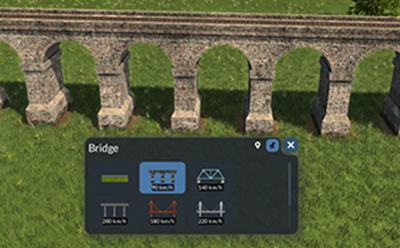
- Keep a save before changing an operating route.
- Select the bridge itself, rather than a nearby signal or station.
- Inspect the available replacement model and its stated limit.
- Read the cost on Replace For before committing.
- After replacement, check the line and observe the same train on the same approach.
The documented replacement changes the existing bridge model one for one. You do not need to bulldoze the crossing merely to select another model. Replacement cost depends on the existing structure and chosen type, so a screenshot from another map is not a price quote for yours.
Separate the bridge limit from the rest of the approach
Suppose the new bridge permits a higher speed but a sharp curve remains immediately before it. Replacing the bridge does not straighten that curve. Likewise, a train leaving a nearby station may not have enough distance to accelerate to either limit before its next stop.
Compare the before and after movement with the same consist, stops and traffic conditions. Look for an actual change on the constrained section. Do not infer an income gain from the model’s higher speed label.
If the train is still slow
- It follows another train: inspect the line’s route and reservation priority.
- It waits at a junction: check switch clearance.
- It accelerates slowly everywhere: compare the actual consist and load before buying another locomotive.
- The restriction appears beside the bridge: inspect the approach track and curve rather than replacing the structure repeatedly.
A useful outcome is removal of the restriction you identified, not merely a more expensive bridge. Keep other upgrades separate so you can tell which change helped.
Player context: discussion of train upgrades and route limits. The financial claims in individual replies are not adopted as universal figures.
Source
Urban Games’ Streets and Tracks manual documents the controls and construction limits. The screenshot is an unchanged developer instructional excerpt, credited for explanation of the pictured feature. The comparison procedure is editorial guidance, not a measured gameplay result.