Transport Fever 3 · Community questions answered
Cannot find train priority? Open the line details, not the manager
On this page
Select a running train, then select its line to open the line details window. The priority controls sit at the lower right: a circle and upward chevrons. This changes advance reservation preference; it does not build an overtaking route.
Published October 20, 2026 · Mouse and keyboard · Sources checked October 19
Use the screen that contains the control
A player searched the line manager for priority buttons and could not find them. Another pointed to the separate line details window, and the original poster confirmed the route through the train’s line link.
- Select a train assigned to the service you want to change.
- In the vehicle window, select that service’s line.
- Read the line name in the resulting details window.
- Inspect the priority controls at its lower-right corner and hover the intended level before selecting it.
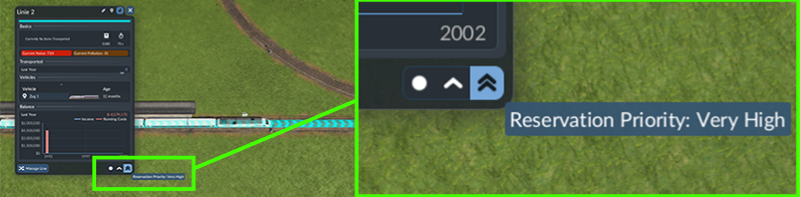
If you are back in a large table of lines, you have opened the manager instead. Return to the train and use its line link again. Check that you selected a rail line before concluding the control has disappeared.
What changing priority can actually help
The manual describes higher priority as reserving additional track ahead. Use it where an approaching express and another line compete for a shared junction. The basic layout must already let one service wait without obstructing the other.
Do not expect a priority change to create a crossover, assign a passing loop or make a train abandon its scheduled route. If the slow train and express are routed onto the same stretch with no usable separation, change the route layout before judging an overtaking experiment.
A useful two-line test
Choose one express and one slower line that already work through a shared junction. Record both original settings. Raise only the express’s priority, keeping its stops and route unchanged, then watch several approaches.
- Does the express get through without the same repeated braking?
- Can the other train wait completely clear of the junction?
- Does the lower-priority line still complete deliveries or passenger trips?
- Was the express still loading at a station when you expected it to reserve ahead?
Compare similar approaches rather than one coincidental departure order. If both trains are already stopped at red signals, their order alone is not a complete test of earlier reservation. Avoid giving every line maximum priority: that removes the deliberate distinction you were trying to test.
If priority is visible but the result disappoints
Inspect the actual route and the waiting train’s clearance. Use waypoints to assign an intended corridor where needed, and the junction-clearance check if the slower train blocks the express’s path. Preserve the original setting if your change only transfers the delay to essential freight without solving the observed problem.
There is no universal priority preset or guaranteed percentage gain here. A successful configuration is one that meets the purpose of your two services in your layout.
Sources and version scope
Urban Games’ official manual supplies the documented controls. Original player discussion supplies the question and community observations. The interface-location answer is confirmed by the original poster and matches the official screenshot. Community claims about exact reservation-block counts are not adopted. The diagnostic sequence is independently written; no personal gameplay test or guaranteed performance improvement is claimed. Screenshots are the developer’s instructional examples, not the forum author’s save.