Transport Fever 3 · Station and vehicle controls
Send to Line: check the first destination before dispatching
On this page
In the line manager, select the vehicle and use Send to Line. Read the line name and the initial-stop dropdown before assigning it. The first destination used for dispatch is a separate decision from the line’s permanent stop order.
Published October 20, 2026 · Mouse and keyboard · Manual checked October 20
Select the vehicle you mean to dispatch
The line manager contains both lines and vehicles. Start by identifying the actual vehicle row. Check its current line and location, especially if you selected several lines to compare services.
Do not use a bulk selection while learning this control. Sending every selected vehicle to the same line is a different action from dispatching one new bus.
Read the First Stop selector
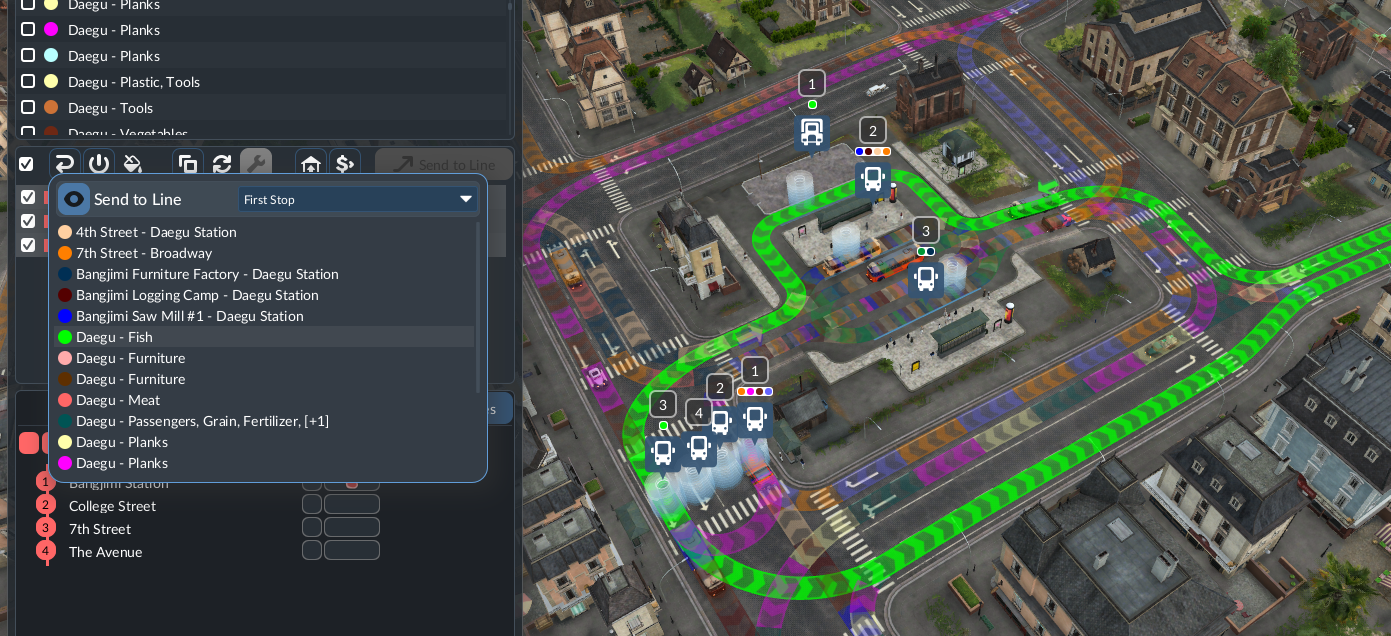
- Select one intended vehicle in the vehicle area.
- Open Send to Line and identify the destination line.
- Inspect the dropdown that chooses the new vehicle’s initial stop.
- Check that this destination is reachable from the vehicle’s current location.
- Assign the line and watch the vehicle’s next-stop display.
For a new cargo vehicle, consider whether its first useful visit should be the source. An empty vehicle arriving at delivery first can look like a loading failure even though it has not visited the producing industry yet.
Keep dispatch separate from editing the schedule
If the established service already runs in the order you want, do not drag its entire stop list around just to give one new vehicle a different starting visit. Check the initial destination in this dialog first.
After it joins the route, watch a complete cycle. If the same wrong order repeats, inspect the permanent schedule. If only the first trip was unexpected, compare dispatch choice and starting location instead.
If the selected stop cannot be reached
Inspect the connection from the actual depot or current track. An existing train completing the line does not prove a newly purchased train can leave its depot onto that route. See the clone and depot-access check for that case.
For a rail route that becomes invalid after signal changes, check direction and return access. Reassigning the line repeatedly does not create a missing connection.
Keep the line name, vehicle, initial stop and first actual arrival together in your test record. That establishes what the dispatch did without changing several unrelated settings at once.
Source and screenshot scope
Urban Games’ official manual documents the controls and compatibility rules. The test sequence is independently organised. Images are unchanged publisher instructional excerpts used to explain their visible controls or layout; they are not our gameplay tests and no blanket open licence is claimed.