Transport Fever 3 · Community questions answered
No path after adding signals? Trace both journeys
On this page
Inspect the new signal’s One-way setting and trace the return trip as well as the outward trip. A signal set to One-way cannot be passed from its back. A route that reaches the first station can still lose its way out.
Published October 20, 2026 · Mouse and keyboard · Sources checked October 19
Start with the change that preceded the error
In a player help thread, converting a confusing double-track layout to directional running led to a second question: why did station connections now report no path? The useful distinction is between “my intended route is forbidden” and “another train currently occupies the required space.”
Record the exact error and where the train stands. Keep its current destination visible. If the error began immediately after editing a signal, inspect that signal first; do not add more signals merely because the line has stopped.
Check the setting, not just the signal model
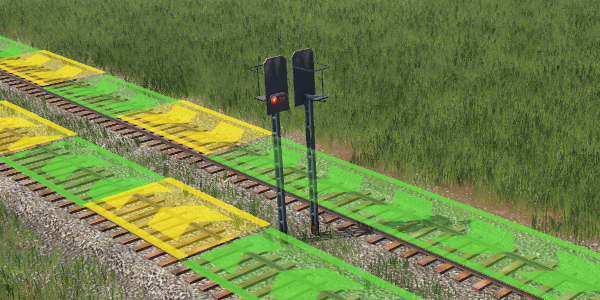
Select the signal and read the One-way dropdown. The official control uses Yes to prohibit passage from the back. Ordinary signals facing away from travel do not impose that same restriction.
- Trace Station A to Station B through each switch and signal.
- Trace Station B back to Station A separately, starting at the assigned platform.
- Mark where the return would approach the back of a One-way signal.
- Correct that local direction or provide the intended separate return path, then check both journeys again.
Example: outbound works, return fails
You intend the right track to carry A→B and the left track B→A. The main line looks correct, but the only switch out of B feeds the outbound track. Setting that track strictly one-way exposes the missing return connection. Relaxing every signal may hide the mistake while bringing opposing trains back onto one track.
Keep the direction plan and inspect the station throat instead: can the assigned platform actually reach the left return track? Check the whole train’s position around nearby switches too. Do not copy a fixed “extra metres” claim from a different player’s train and platform.
Choose the next check from the symptom
- No route even with an empty corridor: inspect direction and physical connectivity.
- Waiting for Free Path with another train nearby: inspect junction clearance and reservations.
- Only another platform is inaccessible: inspect access from the last approach signal.
- Valid route uses the wrong corridor: use a waypoint in the correct stop-list segment.
Verify at least the outward and return movement with your intended configuration. A train reaching B once is not a complete test of a two-station service.
Sources and version scope
Urban Games’ official manual supplies the documented controls. Original player discussion supplies the question and community observations. The forum includes multiple proposed layouts; no arbitrary signal spacing or platform-extension distance is adopted as a guaranteed fix. The diagnostic sequence is independently written; no personal gameplay test or guaranteed performance improvement is claimed. Screenshots are the developer’s instructional examples, not the forum author’s save.