Transport Fever 3 · Rail construction
Crossing tracks do not automatically let a train change tracks
On this page
For a double-slip connection, select an eligible shallow-angle crossing and choose Yes in its upgrade dialog. If the crossing does not highlight, check its angle. A plain crossing can let trains cross the same space without giving them a turning connection between the two tracks.
Published October 20, 2026 · Mouse and keyboard · Official construction reference checked October 20
Check the connection before changing signals
Start with the movement you need. If a train should arrive on Track A and leave on Track B, trace that turn through the crossing. Two rails sharing a point on the screen is not enough: there must be a switch connection for that movement.
A player discussing a six-track crossover asked whether there was a reason not to use double slips everywhere. The more useful starting question is narrower: which movement does this particular crossing need? Keep a plain crossing when trains only need to cross; add turning connections where the route actually requires them.
Select the shallow-angle crossing
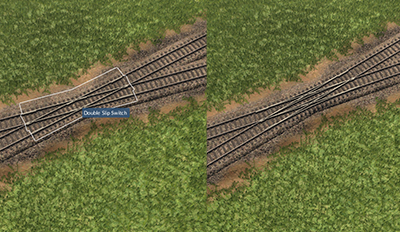
- Keep a save before changing an operating junction.
- Hover the crossing and look for the highlighted upgrade target shown on the left.
- Select it and choose Yes in the dialog.
- Inspect the resulting switch connections, then reopen the affected line and check its path.
If the target never highlights, the manual identifies an overly steep crossing angle as a possible cause. Try a shallower arrangement in a small test area first. Repeatedly clicking the same non-highlighted junction will not show whether you selected the correct target.
Make one route work before expanding the crossover
For a station approach, check one intended platform change first: the incoming track, the new switch connection and the outgoing platform track. Then check the return movement separately. Only after both work should you repeat the pattern across additional tracks.
If the line still chooses its previous track, inspect the scheduled route and waypoint order. A new switch gives the network another connection; it does not mean every train will dynamically choose whichever parallel rail happens to be free.
If the route becomes valid but two trains stop across the junction, inspect full-train clearance. That is a waiting-position problem, not proof that the double slip failed to build.
Underground selection failures need a separate answer
In an October player thread, selecting the underground crossing selected the tunnel instead—even with Underground Mode enabled. Another player reported the same limitation. That discussion does not establish a reliable conversion method.
Do not demolish an operating tunnel on the promise that pressing G will fix the upgrade. If your layout depends on this connection, test selection in a spare save before building the full station throat. A surface junction or a different approach layout may avoid that specific dependency, but it also changes the route and construction costs.
A script error during conversion is different again. Save the error, build and mod list. Do not attribute it to a particular mod, or edit a named script, without reproducing the cause.
Sources
Urban Games’ track-construction manual documents the upgrade and angle restriction. Player context: six-track crossover discussion and underground selection question. The screenshot is an unchanged publisher instructional excerpt; no open reuse licence or personal game test is claimed.
No path after adding One-way signals? · All Transport Fever 3 guides →